Sunday, January 3, 2010

Google Shortcuts: Get all Google Service in one place

In our daily life we really tend to visit more than one Google service now visiting Google service made easy with Google Shortcuts add-on for Firefox. This add-on is really useful and handy add-on to visit any Google product with Firefox browser. If you’re a blogger or person who using more than one Google service then this add-on is recommended. The name itself indicates that it is simple shortcut for visiting Google service/site easily.

The Google shortcuts add-on helps you to visit Google services/sites without typing the URL manually in the address bar of the browser. This Google shortcuts add-on takes you to the appropriate Google website by just one click ! yes, it’s true only one click is needed to visit any Google sites/services. Just click on the appropriate icon of the Google product which is available in the toolbar of the Firefox. You can easily customize the icon or product that you want to add to the toolbar. This customizing option is available in the add-on itself.

Google Shortcuts add-on:

Google shortcuts display options

The appearance of Google shortcuts can be easily change just by navigating Tools >> Add-ons >> Google Shortcuts >> options >> Display options in this we will get a option called “show buttons like a” in that we can select how the icons need to be displayed in our browser. Assume that if we select the Toolbar option then the selected Google product will display the icons on our browser in a liner order or just as icons.

Google shortcuts add-on live image

The above image show the how the icons are displayed if we selected the “Toolbar” type buttons display. But if you selected a large number of Google product then the space required is more so to minimize the space usage the developer provided another option know as “Dropdown Menu” this option can save a lot of space in your browser. The Dropdown Menu option won’t displays the Google service/product icons as displayed in the Toolbar option. This dropdown menu option displays the icons in the pattern of Dropdown so it can save lot space. If have only few products then you can select Toolbar like display.You can also able to choose the option to open in new window or to open in the same window in the “tab behaviour” option.

google shortcuts addon

The above the image of how Google shorts are displaying in Dropdown Menu style option this style can save lot of space in your browser.

Coming to the “Service selection” tab here can get the controls to choose which service of Google product you need to have the shortcut icons of the Google service in the browser. To select the Service just check the box and then click save settings button.

Google shortcuts service selection

That’s it now you’re no need to type the long URL of the Google sites. To visit just click on the icon you will be taken to the Google site. If don’t find you’re favorite Google product URL is not present here(Add-on option) then just inform to the developer by clicking here .

Download Link: Google Shortcuts Add-on

Best search engine for Rapidshare and Megaupload

Today we can see very large number of file sharing sites some of them getting more popular and some of them are not. These file sharing sites getting more and more popular for downloading illegal item because of the privacy purpose. We can get the same illegal item in torrent sites easily but people try to avoid downloading illegal item from those sites because they track each and every download you have made with there site. so, more chance of getting fine from your government. If you download the same illegal item from the rapidshare or other file sharing site they won’t track your downloading what you have downloaded.

So for the safety purpose people won’t go for torrents sites instead they tend to visit files sharing sites like rapidshare, ziddu, megaupload and more. The hardest job is to find your file in file sharing sites because the file sharing sites they won’t provide you search engine to search files inside there server. So today in this post I will try to cover some most popular search engine for file sharing site.

#1 Rapidshare Search Engine:

rslogo_weihnachten

No doubt rapidshare share is one of the most popular file sharing site. It contains too many files inside there server and you can download files at very high speed if you have an premium account otherwise you can download at low speed if you don’t have a premium account. Below are the some of the most popular search engine used to search files inside Rapidshare site.

  1. http://rapidshare-search-engine.com/
  2. http://rapid4me.com
  3. http://www.filecrop.com
  4. http://www.rapidshareindex.com/
  5. http://www.oneclickfiles.com

There are plenty of search engine which are available to search files in rapidshare but most of them contain only affiliate links and adult ads but the above five search engine are the best of all rapidshare search engine.

#2 Megaupload Search Engine:

logo

Megaupload is one of the popular file sharing site next to the Rapidshare the one thing I link here is you can download as many files as you wish for free of cost without having download limit. Below are the some of the most popular search engine used to search files inside MegaUpload site.

  1. http://www.megadownload.net
  2. http://www.gappon.com
  3. http://www.megaupload-searcher.com/
  4. http://4megaupload.com/
  5. http://www.uvrx.com/megaupload.html

The above five site give best result to search files in megaupload.

All the search engine what we added here are giving good result. You can make use of these search engine to search files in files sharing site. If know any other search engine to search files in rapidshare or megaupload then let me about it :)

Recover all your google accounts passwords

Can you imagine life without google talk, picassa or gmail notifier? In these times, a one minute outrage of google services results in panic all over the internet. People across the globe, rely on the google services for their day to day internet activities. Google has provided us with many useful utilities. But all these utilities work from a single encrypted system on your local computer so that you don’t have to enter your username and password everytime you login to any of the following services:

  • Google Talk
  • Google Picassa
  • Google Desktop Seach
  • Gmail Notifier
  • Internet Explorer (all versions from 4 to 8)
  • Google Chrome

But, imagine the case, if you forget the password of your main account. All these services will be locked out and your life would definitely be miserable. To make you safe and happy, there is an application which recovers all your locally stored google account passwords for these services. The application is called GooglePasswordDecryptor, and can be downloaded from here

How it works:

GooglePasswordDecryptor works on the principle that all the google services use a central encrypted database on your computer to fetch your username and password everytime you sign in to these services. Now, it uses different techniques to decrypt these stored passwords to plain text and present them before you in a window

Following is a screenshot of GooglePasswordDecryptor in action:

1

Absolute Uninstaller


Completely Uninstall All Unwanted Applications Easily

Absolute Uninstaller is similar to standard Windows Add/Remove program but more powerful.When weinstall a Software it copies some of its Files usually in C:\Program Files , C:\Windows\System32 , Registry.If we uninstall a Software from Add/Remove Program ( Win+R --> appwiz.cpl).It removes some Files fromC:\program Files only.It will not remove the Softwares Supporting Files and Folders from System32 orRegistry.The more junk files your computer have ,the slower it runs. Uninstall Manager can wipe off all thejunk files clearly in seconds.It offers a more user-friendly way to remove unneeded applications and to improve your computer efficiency.

Completely Uninstall
The Standard Add/Remove Program often can't uninstall applications completely .It often leave files on the hard drive ,associated desktop icons, Start menu entries and keys in the registry. Big registry and large number of unnecessary files make the system slower and slower. Uninstall Manager can clear them in seconds!

Fast and User-Friendly
Absolute Uninstaller starts up more faster than Add/Remove program with all appropriate icons of the application loaded and marks recently installed program. so that you can easily find out the application you want to uninstall. You may also look up the application you want through a handy search function.

Some key features of "Absolute Uninstaller":
  • Completely remove all files and registry keys of an application with simple clicks.
  • Able to backup/restore applications information in the Add/Remove list.
  • Able to remove/restore selected entry in the Add/Remove list.
  • List installed programs with appropriate icons(same as you see in the Start Menu).
  • Find the application you want to uninstall by keyword quickly and easily.
  • Very fast speed listing programs,no need to wait.
  • View more information for each installed program, including product name, company, version, uninstall string, installation folder and more.
  • Export programs list to file.
  • Autofix invalid program entries.
  • Mark new program installed with red "New!".
  • Modify program properties.


Absolute Uninstaller

Transfer Huge files over internet for free with superb speed!

If you’ve faced a lot of problems sending over huge presentation files to your friends over the internet to your friends on the other side of the globe, or sharing holiday videos with your friends then you’ve come to the right place.

WeTransfer is smart service that makes it uploading and sharing files, as easy as peeling a banana. The benefits of this service is that you can upload files with sizes upto 2GB! Along with that, WeTransfer’s servers have a Virus filter which keeps the infected files away so its 100% safe.
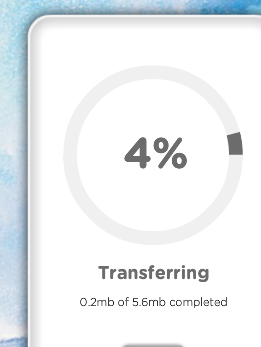
The upload speed is just too awesome and i could upload 60Mb of Data within 5 Minutes with a internet speed of 3 Mbps. The interface is neat. The service is completely free and it supports multiple files, so you don’t need to upload a single file everytime, just select all of them and hit “transfer”.

Uploading

Uploading

You don’t need to sign up either. Just select files, type in your email id and type in your friends email id’s (upto 20 friends at a time) and then once your done with uploading you will get a confirmation mail about the upload and all your friends will be emailed a link to download the files and you could feed in a optional message if you wanted.

If was thinking real hard, as to how the service makes money, and found out that these guys make money by serving branded backgrounds on their service pages? Check out WeTransfer and there you will observe that the background changes, somewhat like Bing and everytime the background changes you see the link on bottom left also changes. That’s how this works. Atlast, someone in the world did come out with a better way of advertising!

iPod Touch Vs iPhone : Makes no sense, really?

In this iPhone powered world (or atleast iPhone buzzed world), we won’t make a mistake of under-estimating the iPod touch which is also a major player in the market.

Recently, when the survey was made about the most sold gaming consoles iPod Touches were high on the charts and this Christmas iPod Touch has topped a lot of things.

App Store download stats

App Store download stats

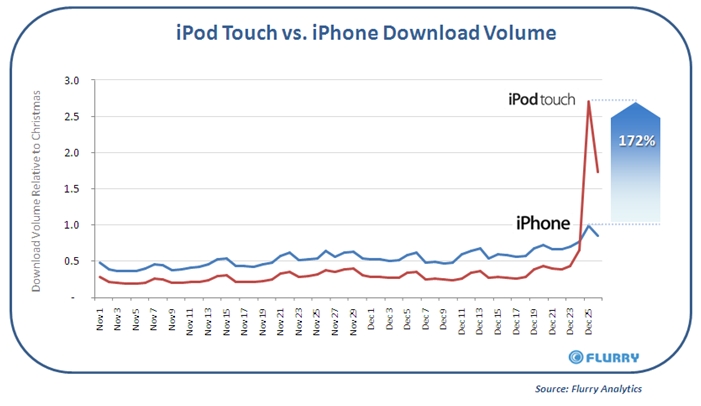
First and foremost being the app store downloads. According to Flurry, which provides statistics about Application downloads on handheld devices, stated that Apple’s app store saw a 51% growth during Christmas and that there was about 1000% growth in downloads from iPod Touches!

This is why people around the web are telling that iPod Touch’s were the most gifted devices this Christmas (surely when compared to iPhone). It’s raining apps for Apple! [MobileCrunch]

There’s something else we had stated, referring to this. When Apple did add a video camera to iPod Nano and not to iPod Touch we said why they were doing this, so that they could sell a hell lot of iPod Touches this Christmas and then later add a camera and those who bought iPods would probably upgrade to the newer iPods soon

Test drive Windows 7 on browser before buying it

If you buy a car often we are allowed to take a test drive. I wonder why no such option exists for software applications and more importantly Operating Systems. But here is a website from Microsoft which allows you to test drive Windows 7 through your browser thanks to their virtual labs. It allows me to use many features in Windows 7 remotely on a live virtual machine.

Windows7_test_drive

  • Ideally meant to be used by developers but it is quite useful for people who just want to get a feel of the Windows 7 OS before upgrading to it.
  • I tested the User Account Control (UAC) feature with Windows 7 from my browser. It allowed me to carry out tests on a live virtual machine. These tests are also accompanied by many videos which are very helpful.
  • I think if you are looking to upgrade to Windows 7 this would be quite a handy website to visit. It is also handy if you are interested in knowing more about Windows 7 without actually purchasing it.

Requirements

  • Windows Live ID
  • Internet Explorer 6 and above. (Drawback was I could not use my Chorome browser for using this websites virtual Windows 7)
  • Requires Active X installed on your browser. (You will need to install Silver Light for IE browser)

Link: Windows Test Drive

5 Apps to Speed Up Copying in Windows

copyUsing a pen-drive to share our photos and other media is a very common practice these days. However what frustrates me every-time I transfer the photos from my camera to my pen-drive is the speed of copying. In Windows XP, it was terrible, Seven is better but not yet up there. So here are five apps that will increase the speed of copying in your Windows system.

  1. Tera Copy

    Perhaps the most recognized file copier, Tera Copy is the leader in the market of external file copier’s. One of its best features is that it replaces the default Windows file copier with its own version. So you don’t have to do anything extra to copy a file via Tera Copy than Ctrl+C and Ctrl+V.

    teracopycompact

    You may download the software from here. It’s free for home users, but causes 14.95 € or about $22 for a pro version.

  2. Extreme Copy

    Extreme copy is another popular file copier. It replaces the default Windows copier with it own version, however you can disable this feature. One interesting feature of Extreme Copy is it supports Break Point which is able to pause the copying operation if or when it encounters any problems, such as file being locked, and resume back when clicked on the “Continue” button once the problem is fixed.

    ExetremeCopyUI

    You may download the fully-working free version of this software from here. The pro version costs $19.95.

  3. RichCopy

    Well this one’s got a history to itself. Although created in the days of Windows 95, it was used as an internal tool at Microsoft. It was not only before some months that they released it for public use. The highlight of this software is that it supports multi-threading copying, ie. multiple files are copied at once hence saving time in the copying process.

    richcopy

    You can download this software from here.

  4. Talent Copy

    Talent Copy looks to better in the hardware side of file copying. It uses an advanced algorithm to limit empty HDD head moves, HDD waste, noise and power on file copying and increase file copy speed dramaticaly. In short, it is better for your hard disk than the default Windows file copier.

    talentcopy

    You can download this software from here.

  5. Copy Handler

    Well this one doesn’t replace your default file copier, but resides comfortably in your system tray. You can call it from up there, schedule the files that you want to copy and even have an option to automatically switch off your computer once the copying is over.

    Copyhandler

    The software is a freeware and can be downloaded from here.

Nokia is suing Apple over every damn product which include iPhone, iPods and Macs!

Its a rule of the game.

When you can’t defeat, you sue

Nokia’s playing the game right. Obviously, the whole Nokia range failed to compete with the iPhone (atleast in the US) so there they go.

Nokia has filed a complaint against Apple with U.S International Trade Comission, claiming that iPod creator has infringed their patents in nearly all the devices they have created, cell phones, music players and computers. Nokia stated that Apple has picked up on UI (User Interface) designs, camera technology, power management and antenna (What?) to create “key” features in their products.

Paul Melin, General Manager of Patent licensing at Nokia said, “This action is about protecting the results of such pioneering development….The ITC case filed today is about Apple’s practice of building its business on Nokia’s proprietary innovation”. Check out Nokia’s Press Release for more detailed stuff.

For a common user all this seems like some crappy stuff, but for these brands it could have cost them billions of dollars. Apple is the most unique company i have ever come across and so i am waiting for these guys to answer Nokia

Google calls for Android press gathering on Jan 5 : Smells like Nexus One

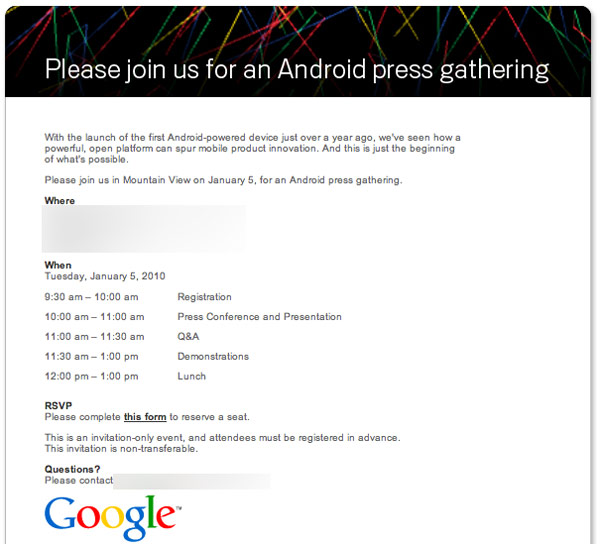
Google has called all its press mates to gather at their California office on 5th January , 2010 for a press conference and discussion.

Put on your thinking hats. Obviously you might be thinking that this is surely related to Google’s Phone, Nexus One which is running on Android OS.

With the launch of the first Android-powered device just over a year ago, we’ve seen how a powerful, open platform can spur mobile product innovation. And this is just the beginning of what’s possible.

Please join us in Mountain View on January 5, for an Android press gathering.

See, it didn’t take a lot of time to join the dots. Google is doing it Apple style, ha? This could be the public announcement of Nexus One features and specs, which were already leaked out by Engadget.

Windows Mobile + Xbox Live : Gaming platform for Windows Mobile?

Microsoft is expanding it’s Xbox live gaming platform to much more then just consoles, but to Windows Mobiles too.
Recently job postings prove it. One of them said,

We need a Principle Program Manager who can help drive the platform and bring Xbox LIVE enabled games to Windows Mobile.

Now thats for sure that, someday, Microsoft is going to come out with this soon. We are currently don’t know what is it exactly about but here’s another piece of job posting which might clear somethings out.

This person will focus specifically on what makes gaming experiences “LIVE Enabled” through aspects such as avatar integration, social interactions, and multi-screen experiences.

Nexus One Pricing Plans, T-Mobile Contract and lot more leaked!

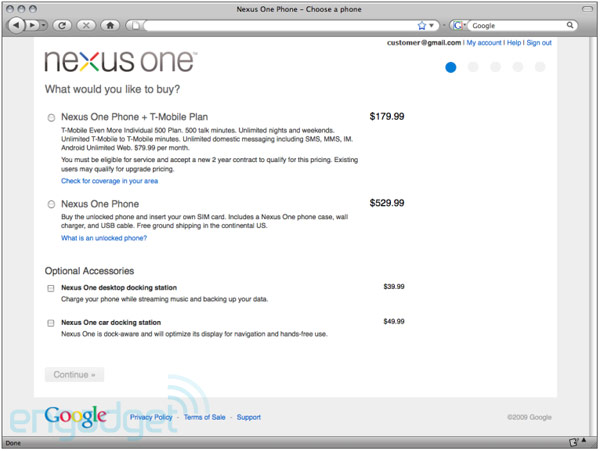
Gizmodo and Engadget got hands on the leaked documents which show the Google Phone’s AKA Nexus One’s landing webpages.

Picture Credit : Engadget

So here’s what is reveals. Nexus One will be available at a price of $530 (unlocked and unsubsidized) and at a price of $179 with a T-Mobile contract which would cost about $79 which would include 500 minutes of talk time, unlimited text, data, and mobile to mobile.

If you try to cancel your contract before 120 days, you have to pay $350 to T-Mobile or you have another choice of giving back the phone to Google (Smart?). Personalization is one of the offerings which allow you to engrave two lines of text behind your phone (Exactly like what Apple does).

Also, you can’t add it to your existing T-Mobile plan and you need to go for a separate Nexus One plan. You can buy this Phone only via the web and 5 Mobile phones can be bought from one account.

Create your own themes without having HTML and CSS knowledge

Are you a blogger and interested in making your own professional looking themes for your blogs ? but don’t have a technological knowledge about creating theme ? it’s ok, now it is possible to create your own theme without know anything about css and html knowledge. This can be made possible with the Artisteer software the one and only Web design automation product. This post explains how we can create our own template with the help of Artisteer software.

Most of the blogger have there own dream towards there blog design but it is not possible to achieve as they dream because they may don’t have the knowledge about the Css and Html. But now there dream can be converted into themes without knowing the html and css with the help of Artisteer software. Yes, it’s true we can make theme with the artisteer.

Artisteer:

Artisteer is the first first and only Web designing product that can create a themes for you as you wish with the help of Artisteer we can create theme for most blogging platforms such as Joomla templates, Drupal themes, Wordpress themes, DotNetNuke skins, and Blogger templates .

Artisteer screenshot

The above image is the screenshot of Artisteer software. It looks similar to the Microsoft word using the Artisteer software we don’t need any technical knowledge because the software is designed in such a way they any one can easily understand the function of this software.

This software contains 11 tabs. These tabs are the main working areas in the software They are Ideas, Colors & Fonts , Layout , Background, Sheet, Header, Menu, Articles, Blocks, Buttons, Footer. We will explain the functions one by one.

Ideas:

ides tab

Suggest Design: The suggest clicking on the “Suggest Design” option you will get theme suggestion that it goes on changing the themes what they have in the software. You won’t get unlimited number of themes but it can able to display some amount of themes what the software contains. In the above image you can see one theme is displaying after clicking on “Suggest theme” option the theme is changed to next theme. The Suggest Design option is used only for the purpose of the changing the theme.

Suggest Colors: The suggest color options goes on suggesting the color of the theme i.e in the first screen shot you may see the white+blue+gray color theme when you when on the suggest colors the theme color may changed to black+read+blue. When go on clicking the suggest colors may go on changing the color combination of the theme. It only changes the color combination of the theme but not theme as in Suggest Design option.

Suggest Fonts: The suggest fonts works same as suggest colors option but it changes only fonts not color.

Suggest Layout: The suggest Layout option goes on changing the layout design of the theme. For example the first image which contains the white theme with one sidebar if you click on suggest Layout property the layout of the theme is changed to some other layout i.e the sidebar may moved to left or two sidebar may comes in this way it goes on changing different property.

Suggest Background: The suggest background helps in changing the background color of the theme without making any changes in the theme it just changes only background color of the them making all the things constants.

Suggest Sheets: This works like a style sheet. It going on change some looking property.

Suggest Header: It changes the headers of the theme means it change background images of the header to another images with different sizes of images.

Suggest Menu: Changes the menu placement, structure and etc . This property deals with menu item.

Suggest Article Design: This goes on dealing with the title property, tags etc

Suggest Blocks: This changes the blocks design structure for example the sidebar blocks design pattern goes changing when you start clicking.

Suggest Buttons: If the theme contains any buttons then you can change the button appearance with the suggest button.

Suggest Footer: This property changes the footer display style.

This completes the Idea Tab. I think you will get some knowledge about Idea tab.

Colors & Fonts:

color

The above image of the colors and fonts tab. This tab gives the more option which is used in the Idea tab for more customization. You can see the same option which is available in the Idea tab but here it goes in depth option means you can find more property which is not displayed in Idea tab.

12-26-2009 3-35-42 AM

For example you can see the above image which is the property of “Color Themes” this option works same asSuggest Colors: option which is available in the Idea tab here is the we can easily choose the properties. All other option available in this tab gives more option so that we can easily customize our theme.

All the other tabs i.e layout, background etc which provide the same functions which are explained in the Idea tab but here they give more property or for every there they will displays the dropdown menu as showing in the color Themes option in the above image.

Official Videos:

Introduction to Artisteer

Working with Artisteer

Pros:

  • Easily create themes for any blogging platform.
  • Easy to use
  • No need to have a technical knowledge
  • professional looking theme can be created
  • We can add personal images in the header what we see in most professional blogs

Cons:

  • Slow: If you click to change the theme color then you may need to wait for 5 to 8 sec of time to change
  • Cannot able to change the size of the sidebar or content area.
  • You cannot able to apply any creativity to design. All are fixed you need to work within that boundary itself.

This software is only recommended for those peoples who don’t have the knowledge of theme creation. This software is not for the people are who the some what css and html language because those peoples can create there own theme with there own creativity.

Download Link: Artisteer software

Saw a video? Copy it to your system

Every time the videos that we see on a website gets stored on our local disk in the form of cache. Most of us don’t know about it and we simply start downloading a new copy of the same watched video with the help of some software. Why we need to wait again if already we have downloaded the video?

So, today I will introduce an utility which can help you to take the cache from your browser and copy to your desktop or local disk.

Video cache viewer:

Video cache viewer is the utility that can help you to take the copy of videos seen to your desktop. Usually after watching a video the file is stored in the browser cache. This utility can help you to extract the video file from the cache and save it for watching in future. Note that all videos aren’t stored in the cache, but most of them does.

This video cache viewer automatically scans the entire cache of the Internet Explorer and Mozilla based web browser and find if any video cache (video file) are stored in your browser’s cache. If the cache is present, then it will display in the video cache application window.

The displayed cache or video files can be easily moved into our local desktop for further use. So, you never get worried about downloading the same watched video again.

Using Video Cache viewer:

This utility is available in two types, one is install/uninstall support and another is without installation i.e. standalone application. Run any one of the application, after running the application you will see some options, but we don’t need all those. We need only “Play selected File” and “Copy selected Files To…” option.

Play Selected File: This option allows you to play the selected File there only. Note that firstly we need to configure the video player that must supports or play the *.flv format file.

Copy Selected File: This is the most used option, which is available in the video cache viewer. This option helps you to make copy of the selected file (video files) to our local drives to play the video for later use.

The above two options are the most used option, but in this post we will try to cover all other options too for better understanding.

Open Download URL in Browser: This option helps you to open the web-page where the selected video is downloaded.

Delete Selected Cache Files: Deletes the selected cache file from the browser.

Export Selected Items: This helps you to save the information about the video in *.txt format.

Refresh: If currently watched video is not present in the cache list, then just make use of the Refresh option, it will display that video in the list.

Properties: Displays the property of the selected video.

Find: If the cache list is too big, then use the find option to search the video file.

Exit: Exit the cache viewer application.

I hope this post helps in minimize download task and don’t forget to share your opinion after using this application.

Download Link: Video cache viewer

How to Burn ISO File to CD (without Nero)

The other day I had downloaded Ubuntu’s latest version (9.10). The file that I received was that of an .iso format. The next step is to burn it to a CD. Now this is where a lot of people get confused. They usually burn the ISO as a file rather than that of a CD image. Not getting it? Just read on.

First of all what’s an .iso file?

Well its basically an image of the CD as it is. Rather that burning it as a file, you’ve got to burn it as an image into the CD.

Now here’s where the second trouble arises. If you were to search for something like ‘how to burn an ISO file’, you would probably get the answer of using Nero. Although it is a good software, it costs some dough (I’m an open source guy! ;D) and of late it’s got a lot of bloat accompanying it.

So what’s the free alternative then? Well a little searching around could lead to a lot of alternatives, still I prefer ISO Recorder (currently v2) Alex Feinman. You can download this software from here. It is currently available for Windows XP and above (even Seven.) It can be used to burn ISO’s to a CD or DVD.

Once downloaded, the installation is a breeze. Now just right click on the file that you want to burn as an image to the CD, and select ‘Copy Image To CD.’ That’s it, ISO Recorder would fire up immediately. Choose the drive you want to use for the burning process. You can also configure certain options like ‘Recording speed’ and ‘Eject afterwards.’

10 things that impacted technology this decade

We have come to the last couple of days of the first decade of the 21st century. So I thought I would write about the top ten tech moments or products in the last 10 years. This is mainly a personal opinion on products, services that have impacted the tech market in a positive way.

Ipod#1. The iPod: This one is something that actually saved Apple from drowning. It was released in the year 2001 and immediately caught the imagination of almost everyone who wanted to listen to music. Apple was a company at the edge of bankruptcy making losses. The iPod and its craze changed everything. The fall out was fantastic for Apple as ironically a lot of people looked at buying Macs because of its popularity and reputation gained thanks to the iPod. If Apple is at the helm of smart phone technology with their iPhone its because of the legacy started with iPod early in the decade.

Google_adwords#2. Google AdWords: Google search engine was a winning product but how to monetize it? In the year 2000 Google launched Adwords. This revolutionized making money online. The idea of getting people to pay for search listings was not a new one but Google did what no one did and that was it let the market decide what it wanted to pay for every click on a AdWord. An exstension of AdWords was AdSense which allowed the Blogging industry to become money earners. Even Devils Workshop is today running becauseAdSense and hence it is impossible to not include it as a positive impact for this decade in the tech world. It is estimated Google makes over $5 billion from AdSense revenues.

Wordpress#3. Wordpress: This is what a huge majority of bloggers in the world use for designing their blogs. You might be suprised but a lot of websites which are not necessarily blogs are also designed with Wordpress. An open source blog publishing application, Wordpress started gaining momentum from development and design ideas coming from ground up. It was first released in 2003 and since then it has set the internet on fire with over 200 million websites using Wordpress.

Wikipedia#4. Wikipedia: I did grow up in the pre-wikipedia age where if you had to look up information on the Bengal Tiger or India’s population you had to refer to either the Worldbook encyclopedia or Britanica Encyclopedia. Now you just search for at Wikipedia. With over 14 million articles in various languages it has become a must for anyone searching for information on almost anything. The online encyclopedia is written by people like you and me on subjects that we know about.

Social_networking#5. Social Networking: I doubt anyone reading this is not listed on some social networking website or the other. It all started with connecting with old school friends and led to being a phenomenon where not we use social networking websites like Facebook, Twitter and MySpace to do a host of things which includes searching for jobs, clients, technology and lately gaming. There is no denying that the last 10 years the internet has shifted focus to social networks a lot more than ever before.

YouTube#6. You Tube: Ten years ago if we had to catch a music video or look up a news clip you had to wait for it to reappear on the television tube. Today we look them up on You Tube. It was created in 2005 and became hugely popular and soon after Google bought it. You Tube is massive for the internet and it has not been completely monetized. It has been used for commercial campaigns to political messages and it has led to the under 30 population being called the YouTube generation.

unlimited_storage_email#7. Unlimited Email storage: Back in 2000 we had Hotmail give us 2 MB inbox storage space. Most of us were overjoyed when Indiatimes had offered 10 MB space with its email service.Gmail entered the market with the promise that you do not have to manage your storage space. This had a domino effect and any serious player in the Email service will not dream of offering you anything but unlimited storage. Instead of 10 MB total storage space within years we have moved to 10 MB limit for attachments.

blackberry#8. Blackberry: Research in Motion (RIM) released BlackBerry smartphone and we had the birth of the smart phone. It basically replaced the need for a computer to check emails and surf the net. You can do that with your phone. With the ever increasing closing of the gap between a netbook and a smart phone we should soon see smartphones making netbooks obsolete. All this will be probably with a huge thanks to the rise of the BlackBerry in this decade.

Google_maps#9.Google Maps: Finding a place or getting driving directions has become revolutionized with Google Maps. It was not that there were no previous endevours in mapping the world but Google Maps allowed you to list your business on their maps which transformed Google Maps into a ever evolving interface which is not extensively used. With Google Earth it gets us satellite pictures on our computers which was surely not something people thought possible 10 years ago.

open_source#10. Rise of Open Source: The rise of Open Source technology has really captured the imagination and come out of the dark alleys where products and applications were used only by developers and people in the know. The dominance of Microsoft has still to be shaken in the OS market but when it comes to applications open source technologies are surely taking over. It also has now got people understanding the concept that Open Source does not mean free software but freedom from control of software development.

Easter Egg In Python Programming Language

Python is a dynamic programming language that can be used for many kinds of software development. It offers strong support for integration with other languages and tools, comes with extensive standard libraries, and can be learned in a few days. Many Python programmers report substantial productivity gains and feel the language encourages the development of higher quality, more maintainable code.

Python is Portable it runs on Windows, Linux/Unix, Mac OS X, OS/2, Amiga, Palm Handhelds, and Nokiamobile phones. Python has also been ported to the Java and .NET virtual machines.

Ok Lets now see the easter egg in Python

  • Open Python Interactive Interpreter,
  • And type:
It will print Zen of python, design principles of Python

5 Awesome Google Chrome Extensions for someone who runs a business


Google Chrome is one of the browsers that gave a new meaning to the words “Web Browser”. At first people thought that Google Chrome was just another browser. But after some with its amazing features and extensions it has proven that it is not simply “just” another browser.

A lot of users still use Firefox because of the enormous collection of add-ons that could be used with it. Now Google Chrome users can have extensions with it and it is not a mistake when I say that Google Chrome has also got a large collection of good quality extensions built for it. Extensions or add-ons play a very vital part in a browser. It gives further ability and power to the browser and also allows its user to modify some of the aspects of the browser to their desires.

Today I would like to shed some light on 5 great extensions for businessmen or for a man with a busy schedule and lots of clients. These extensions are sure to make their life easier while on the internet.

1. Gmail Checker

This tool will show if you have any unread emails in your inbox. It is a handy tool because when you have this extension you won’t have to go to gmail.com and check if you have any new mail.

2. Google Tasks

With a busy schedule it would be difficult to manage all the tasks you have to do every day. With this extension you can make a list of the tasks you have to do for the day and complete it.

3. Bubble Translate

This tool allows translating text and full websites. It will be easier to get information or check a client’s website which is in another language with this tool.

4. AdBlock+

When you are browsing the internet and while surfing for information over the internet, it would be really annoying to have popups and advertisements popup in front of you every time you click a link. With this tool you can block those advertisements and popups and find the information you need faster.

5. Chrome Currency Converter

When buying things and selling online it is really frustrating to convert every single pricing to another currency and the worst part is it takes a lot of time from your busy schedule. This extension converts all the currencies in a site to a desired currency of the user. And it comes with a mini converter.

Manage your recycle bin with BinManager

this command enables you to empty all but the most recent items from your recycle bin. This is useful for several reasons:

  • You’re most likely to need to restore recently deleted items.
  • For large drives, you may want to maintain smaller recycle bins than the minimum 1% permitted by Windows.
  • Large recycle bins prolong the shutdown process.

Once installed you can right click on your recycle bin and delete items on the basis of time period. The software will work on any Windows XP, Vista or Windows 7 system.

This command enables you to empty all but the most recent items from your recycle bin. This is useful for several reasons:

  • You’re most likely to need to restore recently deleted items.
  • For large drives, you may want to maintain smaller recycle bins than the minimum 1% permitted by Windows.
  • Large recycle bins prolong the shutdown process.

Once installed you can right click on your recycle bin and delete items on the basis of time period. The software will work on any Windows XP, Vista or Windows 7 system.

Link: Download BinManager |Homepage

For Noobs : 5 Things To Do After Getting A Twitter Account


Twitter is the most famous micro blogging social network site. A lot of people have tried out Twitter, but a lot of them did not know what to do after they got an account and started micro blogging. There is much more to it than just having an account and micro blogging. Here are just five things you can do after getting your Twitter account.

1. Update your profile

    When people visit your Twitter page, they often look for information about the person. Filling out the profile will let the visitors get a better idea of the person who is tweeting.

    2. Create a Twitter background

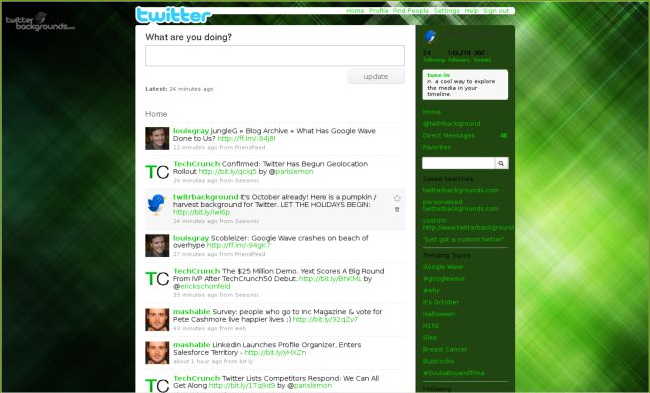
      Giving your Twitter page a unique look with a unique background is an awesome way to let others know that you are creative and professional. There are some websites which offer a collection of Twitter backgrounds so that you don’t have to create them by yourself. For example TwitrBackgrounds offer a large collection of good quality backgrounds. There are also people who do custom designs of Twitter backgrounds.

      3. Follow people

        While on Twitter it is a good idea to follow people who have common interests. To find out people who have common interests as you, you can search for your interests on Twitter and then find people who blog about them. There is also another amazing service called Twibes which finds groups of people with common interests. I suggest using this service instead of manually searching on Twitter since it is much easier.

        4. Get your Twitter Client

          If you are a very active Twitter user then you need a client for your laptop, mobile and browser. This way you don’t have to go to Twitter.com and update your status. Instead of that you can update it directly from your desktop, mobile or browser.

          5. Get your Twitter badge

            For the owners of personal websites and blogs it will be a good idea to have a Twitter badge. Twitter badges are little gadgets that will show your Twitter posts right inside them which can be used embedded in your blog or website. To get a Twitter badges visit http://twitter.com/badges

            These are just 5 things you can do with your Twitter account. After doing all of the above be sure to be a regular Twitter user so that you get more followers and friends.

            Blogger Templates by OurBlogTemplates.com 2008