Easy File Locker is a light-weight and easy-to-use file lock software product for Windows. It can protect your private files and folders. With its great protection, users will not be able to open, read, modify, delete, move, copy the locked files/folders, or even not be able to see it. The hidden files/folders will be totally invisible to all users and to any program.
Features Of Easy File Locker 1. Lock files, Lock folders: The locked files/folders are protected from accessing, users can not open, read, modify, move, delete, copy, rename the protected files/folders. Files and sub-folders in a locked folder are also protected.
2. Hide files, Hide folders: You can hide your private files and folders, to make them completely invisible to users and programs.
3. Password protected GUI and uninstaller: Once you set a password, no one can launch the application or uninstall the software without the correct password.
A Simple Utility To Convert Documents To XML Format XML Printer is a virtual printer driver allowing you to convert any printable document to a structured and easy-to-read XML file.
What is a virtual printer? Virtual printer is a physically non-existing printer that acts to the operating system like any other printer. This way the system or application prints as it would be an ordinary print device (ensures that the document will look the same), but instead of printing it stores all the printed information.
Key Features Of "XML Printer":
Acts as a regular printer, but instead of printing on paper, it'll store all printed information to an XML file.
Exports any information, i.e. if you can print the data - XML Printer can export the data
Exports texts, with lots of different attributes: font face, font size, style (bold, italic), position, extent, color, rotation angle
Exports images as BMP, GIF, JPEG, PNG file with position, width and height.
Exports vector data, such as paths (filled or transparent), rectangles or lines with all important attributes (fill color, outline color, line width, raster operation)
Automate post-processing of the XML files, the driver is capable of running any executable with path to the XML file as parameter
Convert any printed XML file to PDF, recreating the source document.
Filter printed output to required fields only by any attribute you can think of.
Wamon - Windows Activity Monitor Windows Activity Monitor monitors user's activity on the computer, tracks active windows and processes, allows table and chart visualization.
Whom Can You Monitor ?
You can check what you did whole day before computer.
To check what others are doing on your computer.
To monitor employees whom you suspect working or not.
How does Windows Activity Monitor work? Windows Activity Monitor periodically records foreground window and its process executable to give out various statistics and charts. You can group windows and/or processes using regular expressions and see simplified output like "Work", "School", "Fun", etc.
Additionally, thanks to its browser interface you can set Wamon to watch the computer activity or statistics from a different computer.
Google sand box is nothing but a probation period for your newly created website or blog. During this period your posts or article may not be listed on Google organic search result pages (SERP). Google won’t give weightage for those website for a period of time. During this period Google would be monitoring your website for its activities and pattern of posting and analysis whether it is a genuine website or not.
Many webmasters are disappointed during this period because even though they may have created a wonderful website with all keywords in place the site may not be listed for proper keywords on Google search. But it is important to know about the sand box effect and work towards website improvement during this period and wait for the sand box period to get over which may be from one month to six months.
If you target for keywords which are having more competition then your waiting period may be higher. This could be considered as a policy of Google to fight spam websites.
Banned vs Sand box
Most important here is to identify whether your website or blog is on a Google sand box or banned by Google. It is pretty easy to identify,for this you need to search your domain name as below “site: example site:free-ticks.com”, if the count here is increasing as and when you post a new article then you can be sure that your websites are getting indexed and you just need to wait to get out of Google sandbox.
Google sand box is nothing but a probation period for your newly created website or blog. During this period your posts or article may not be listed on Google organic search result pages (SERP). Google won’t give weightage for those website for a period of time. During this period Google would be monitoring your website for its activities and pattern of posting and analysis whether it is a genuine website or not. Many webmasters are disappointed during this period because even though they may have created a wonderful website with all keywords in place the site may not be listed for proper keywords on Google search. But it is important to know about the sand box effect and work towards website improvement during this period and wait for the sand box period to get over which may be from one month to six months. If you target for keywords which are having more competition then your waiting period may be higher. This could be considered as a policy of Google to fight spam websites.
Banned vs Sand box
Most important here is to identify whether your website or blog is on a Google sand box or banned by Google. It is pretty easy to identify,for this you need to search your domain name as below “site: example site:free-tricks.com”, if the count here is increasing as and when you post a new article then you can be sure that your websites are getting indexed and you just need to wait to get out of Google sandbox.
What to do when you are on sand box
There are a lot of things you can do when your website is on Google sandbox 1. Try to add valuable posts or article on your website 2. Try to build links organically. 3. Try to promote website or blog through social networking sites 4. Try to harden website security 5. Try out different plugins and bring the website to a stable state 6. Finalize the layout and categories
So get ready for a better exposure after your sand box period.
Most people who use search engines often use it for looking up local information. Google Search is quite handy to look up phone numbers for restaurants, hospitals and other important details you might require.
But what if I did not have access to the internet. Well I can always call up a friend and request him to search for an address or phone number. A few days ago I needed to find some phone numbers to all the hospitals in the locality I live in. I called this service JustDial and got all the information I needed. They sent me the address via email and also sent me the address and contact numbers through SMS. This was quite handy to look up locally listed businesses or services on the go.
Just Dial on Internet
Using Just Dial website I could look up all the hospitals in my locality. It apparently covers over 250 cities in India and is probably the best way to search for local information in India.
You can order flowers to someone, check out places of interest like restaurants and hotels by specifying the locality in which you are searching within the city, so that narrows down your search results. For instance I looked up hospitals only in my locality and not the whole city.
There are many other specialized local listings, like a section on movies which allows you to select a movie and location you are in. It shows up a list of theaters the movie might be playing in.
Just Dial on Phone
As I wrote before you do not need to be online to use JustDial. All you have to do is call Just Dial which is a local call from any city in India where the service is available.
Their number is 6999 9999 and someone on the other end of the call does the searching for you. Then you can give your mobile number and ask for the relevant details to be sent through a text message.
I have used this service a few times, it is a great help during emergencies. Not everyone has internet access over a cell phone. People who are not really into using internet website can also use this service with a simple call from any land-line.
So what do you think? Is it the best local search engine for India as they claim. I definitely think their boast is accurate.
Yesterday I came across a online tool called Intodit to create a Wiki on just about anything. This is quite useful to create documentation or have a group working on a project to create a reference guide for some day in the future.
It can also be used for non-professional needs like creating a wiki for a city or even on a hobby. Wiki is a great way to learn as you can also involve other people with similar interests to add to the wiki and make it more comprehensive.
Intodit Features
First I needed to register and create an account. Then I needed to select ‘Create a wiki’.
I could create multiple wikis on the same account with Intodit.
I could also invite my friends to use and edit the wiki with their email ids.
Once I started creating new pages and editing them, the dashboard was quite easy to use and had many options.
It does support different fonts, allows inserting images and also has support for adding widgets which are video, music and chat related. (see image below)
Dashboard while editing a page with Intodit Wiki
This seems like a ideal tool for people who have expertise on something, want to create a wiki and collaborate with others having with similar interests.
Intel Corporation and Advanced Micro Devices (NYSE: AMD) today announced a comprehensive agreement to end all outstanding legal disputes between the companies, including antitrust litigation and patent cross license disputes.
In a joint statement the two companies commented, “While the relationship between the two companies has been difficult in the past, this agreement ends the legal disputes and enables the companies to focus all of our efforts on product innovation and development.”
Under terms of the agreement, AMD and Intel obtain patent rights from a new 5-year cross license agreement, Intel and AMD will give up any claims of breach from the previous license agreement, and Intel will pay AMD $1.25 billion. Intel has also agreed to abide by a set of business practice provisions. As a result, AMD will drop all pending litigation including the case in U.S. District Court in Delaware and two cases pending in Japan. AMD will also withdraw all of its regulatory complaints worldwide. The agreement will be made public in filings with the Securities and Exchange Commission.
“This is a historical settlement for the microprocessor industry. The settlement will set transparent ground rules for open, competitive markets, with which Intel, in full public view, has agreed to comply. Fair and open competition dictates that the best product wins and market forces prevail. I am very confident that this development will help us strengthen our market position.” said Ramkumar Subramanian, VP, Sales & Marketing, AMD India.
So, as long as the competition keeps going, we as the customer have the freedom of choice and the market remains democratic. The day there’s monopoly, the company is free to manipulate the market for its gains and innovation hits a dead end. Any company needs to realize that competition is necessary and healthy. It helps them innovate and come up with new products to one-up the competition. It also justifies the reason to pay salaries to their sales & marketing departments that help promote the brand and attack the competition.
Did you even care about the dispute? Would you now care about this settlement? Do you think it affects you – the end consumer? Share your thoughts.
Here is a very cool andsimple trick to hide any partition of our hard drive on computer. Many times we will think of hiding some confidential data form others.I have shown two easy methods to hide partitions without using any software.
Hide Partitions Using Command Prompt 1. Go to Start-->Run. 2. Type Diskpart and press Enter. 3. In the console type List volume to see all the drives available on your PC. 4. Now select the drive which you want to hide. Note: Here I have shown how to hide E drive. 5. In My PC it is volume 2 for drive E . 6. Now to hide drive E type Select volume 2 . 7. Then type remove letter e , this will hide your drive. 8. Now to get your drive back type Select volume 2 and then type assign letter e.
Hide Partitions Using Computer Management 1. Right click My Computer. 2. Click Manage or press letter G. 3. This will open Computer Management. 4. Under Storage, select Disk Management. 5. Right click on the drive which you wish to hide. 6. Select Change drive letters and paths...
7. Click Remove 8. Now can find your partition will be hidden. 9. To get back the partition Computer Management-->Select drive--> Change drive letters and paths 10. Now select Add option. 11. In that Assign the following drive letter. 12. Select ok.
Couple of days ago I came across Mobikwik, a website that allows you to recharge or top-up any mobile phone’s balance in India. It covers all major telecom operators like Airtel, Reliance, Tata Indicom, BSNL and Vodafone along with smaller operators in India. That is almost 300 million potential mobile phone users in India. There may be other websites which allow you to recharge your phone but Mobikwik did catch my attention because it’s user interface is very simple and hence very helpful. Mobikwik also has plans to introduce India’s first open web API for recharging phones.
Recharging Balance
You need to first register at the Mobikwik website and then enter the mobile number of which you want to recharge the balance.
Then you need to enter the amount into Mobikwik balance. The payment options are netbanking/debit card, Credit Card, Cash Card and Cheque payment. The website claims that Paypal will be introduced soon.
This balance from Mobikwik can be transfered to any mobile phone to recharge it’s balance. You can recharge upto 5 phone numbers.
Searching for Plans
Another great feature was searching for best mobile plans based on location or circle which you might live it. For someone looking at getting or changing to a new plan this seems to be a great reference guide. This section has a lot of tweaks which allow you to customize your search for the best plans avaialble from all operators. It takes into account the number of calls you might want to make, validity of plan, number of SMS and many other options can be taken into account before the relevant plans are shown.
I think a lot of our readers may have used Digsby or atleast read about it. It has been reviewed a couple of times in the past on Devils Workshop. I have recently started using Digsby and I am hooked on to it. It has a simple, clean and easy to use user-interface along with a lot of really neat features.
Overview of Digsby
For readers who may not be aware of Digsby it is a desktop application which allows you to manage multiple Instant Messenger, Email and Social Networking accounts at one place. Previously when we reviewed the software it did not have support of Mac or Linux Operating System but now it is available on both.
It does force you to create a Digsby account and this is where it is different from other desktop applications as the accounts you manage from with Digsby are stored on a server and hence available on different computers.
I downloaded and tried a few things with it. Digsby has integrated Facebook Chat into its software which is very useful. This means I do not need to keep a browser window open to chat with my Facebook friends.
It allowed me to keep a Gobal Status which is put up across all the accounts I have selected.
Below is a video from Digsby giving a view into its features and usability. Watch it and let me know what do you think about it through your comments.
Today, Adobe Systems at 2009 BlackBerry® Developer Conference, Research In Motion (RIM) in India, announced that they were going to give the Creative Suite Professionals the chance to make Rich Content and applications for Blackberry!
Jim Balsillie, Co-CEO, Research In Motion said, ” There is tremendous opportunity for RIM and Adobe to align our platforms to help developers create BlackBerry applications that are highly engaging and deeply integrated in order to deliver the best user experience in the market”.
Flash is coming to Blackberry soon, with the Release of Creative Suite 5 in which developers will be given the features to make Image and Video content optimized for Blackberry’s from Adobe Dreamweaver®, Adobe Fireworks® and Adobe Device Central, Adobe Photoshop®, Adobe Illustrator® and Adobe After Effects® and a lot more.
Amazingly, it will support flash’s key component, and that is Adobe air. The Company was working on a open source project to make the Flash Player for BlackBerry and so, Adobe air is going to be a part of it.
The biggest advantage of having such things, is that it simplifies the work of developers to spend hard time working for thier applications to work on Blackberry, but after they get hands on Adobe’s Creative suite 5 all this will be history and you can expect a lot more cooler applications!
Press Release after break,
RIM and Adobe to Simplify Delivery of Rich Content and Applications for BlackBerry Smartphones
Adobe to Deliver Support for BlackBerry Smartphones within Adobe Creative Suite; RIM to Incorporate Flash Platform into BlackBerry Platform
INDIA — Nov. 9, 2009 — At the 2009 BlackBerry® Developer Conference, Research In Motion (RIM) (Nasdaq: RIMM; TSX: RIM) and Adobe Systems Incorporated (Nasdaq:ADBE) today expanded their collaboration and announced that creative professionals and application developers will be able to use the Adobe® Flash® Platform technology and Adobe Creative Suite® content development and authoring tools to easily create rich content and application experiences for BlackBerry® smartphones.
“There is tremendous opportunity for RIM and Adobe to align our platforms to help developers create BlackBerry applications that are highly engaging and deeply integrated in order to deliver the best user experience in the market,” said Jim Balsillie, Co-CEO, Research In Motion. “We are working closely with Adobe to enable our developer communities to build rich content services and BlackBerry Widgets that leverage the latest runtime environments, APIs and network services through Adobe’s industry leading design and development tools.”
“RIM is at the forefront of driving smartphone innovation, and it’s only natural that further integrating our respective platforms will set new standards for engaging content and applications,” said Shantanu Narayen, president and CEO of Adobe. “The expanded partnership between both companies will open up great new opportunities by making it even easier for content designers and mobile application developers to create rich and compelling content for the BlackBerry platform.”
Future versions of Adobe Creative Suite starting with Adobe Creative Suite 5 will provide the ability for designers to create optimized graphic assets, such as image and video content, from tools such as Adobe Photoshop®, Adobe Illustrator® and Adobe After Effects®, for the BlackBerry platform. These graphics assets can then be easily imported into BlackBerry application development tools, including the BlackBerry® Java® Plug-in for Eclipse™ (www.blackberry.com/developers/java) and the BlackBerry® Web Plug-in for Eclipse™ (www.blackberry.com/developers/web), for use in applications and user interfaces. Backgrounds, icons and images created with Adobe tools such as Adobe Photoshop will also be able to be used in the new BlackBerry® Theme Studio (www.blackberry.com/developers/themes) to create compelling BlackBerry themes. Adobe Dreamweaver®, Adobe Fireworks® and Adobe Device Central software will also be enabled to support the creation and testing of BlackBerryWidgets and web content optimized for the BlackBerry® Browser. Additionally, users will be able to directly import photos and video captured on their BlackBerry smartphones and edit them using Adobe’s consumer offerings including Photoshop Elements and Photoshop.com.
The collaboration aims to accelerate the mobile application and content development workflow between BlackBerry application and web content developers and creative professionals that use Adobe tools. It will also reduce the re-creation of graphic assets and iterations that designers and developers have to go through to generate rich application user interfaces, animations, images and video content when supporting multiple platforms.
Today’s news builds upon the recent announcement that the two companies are working together as part of the Open Screen Project to bring the Adobe Flash® Player browser runtime to BlackBerry smartphones. The two companies will also be collaborating to adapt other key components of the Flash Platform including Adobe AIR®.
RIM and Adobe are demonstrating a sneak peek of the enhanced mobile authoring workflow during the keynote address today at the 2009 BlackBerry Developer Conference. To learn more about this collaboration, developers can visit the BlackBerry® Developer Zone (www.blackberry.com/developers/adobe) and Adobe Developer Site (www.adobe.com/devnet).
Windows is the most used Operating system on earth no matter what you say, it covers 90% of the general market (I don’t want to take any favour) and so there you go with 5 unusual shortcuts for windows.
1) Copy content from windows dialog boxes How many times has your non-techie uncle from far away come across an error dialog box, which he wanted you to look into? Rather than explaining him to do a print screen and all the other rigmarole. You can ask him to click anywhere on the dialog box press Ctrl + C and then Ctrl + V into notepad or email
2) Bring up Systems Properties dialog Wanted to see your system information? Just use Win Key + Pause/Break
3) Bring up File/Folder properties dialog Select any number of Files or Folders and press Alt + Enter to see the properties.
4) Navigate to your “Home Folder” Usually by default the “Home Folder” in windows is C:\Documents and Settings\ to go there without navigating the whole way simply go to Start -> Run and type “.”
5) Save time cropping your screenshots. Use Alt + PrtScrn to take a screenshot of only the active window, saving you countless hours of cropping fun.
How Many Buttons are there on your mouse? 2? 4? or perhaps only one after you got hands on Apple’s Magic Mouse? To kill those numbers there comes a Eighteen Button mouse which are programmable!
It’s also got a analog joystick and can support 52 key commands! WarMouse has entered a partnership with OpenOffice.org to provide this amazing product to you at the price of $75.
Now Since, it was made in partnership with OpenOffice it has got default profiles for five OpenOffice.org applications and along with that 20+ Games and also has a default profile for software like Adobe PhotoShop.1
If u Remember few days back Photoshop.com app was released for iPhone and iPod Touch (Pictorial Review) which was a hit as per features and was available for free.
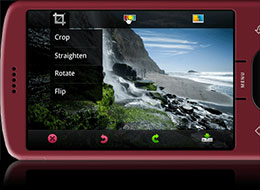
This App allows Android users to Edit Pictures using touch interface and also allows you to back up all your Photos online, to Photoshop.com.
The Editing interface is same as the iPhone interface, and this app is available on the Android app store so if your on a Android, get it now!
Compare a Plasma Screen with Home Theatre System to your Computer Screen, Dull isn’t it? Obviously. But now, chuck your computer screen and get to your Television man, and enjoy Youtube Video’s in HD, Flickr and much more!
Western Digital’s WD TV does it all, and especially it’s support for HD makes it an awesome Gadget! Music, Video and Photos from everywhere go into the device and then to your television. Neat.
WD TV
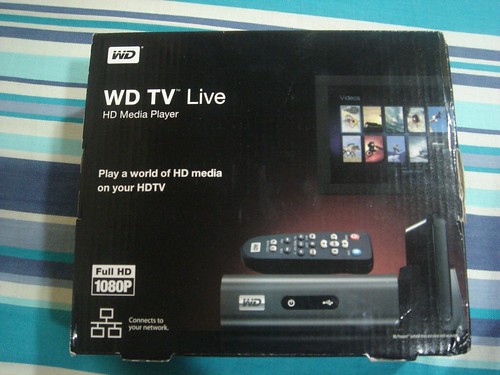
What i got in the Box – WD TV Live
WD TV Live HD Media Player (Call it WD TV, it rhymes though)
Charger, Remote and batteries
Av Output pins and Component output pins
Few Papers (Manuals) and a CD
Enough for me to get started! Unboxed. Now, i go on to fit this piece with my Television. I am using a LG LCD 19″. Practically, you can use any Television and for Best Results, Try it on Plasma (I tried it on a Samsung 32″ Plasma also and the output was too good!) with the Component wires for Better Quality or if you want something better then that too, get the HDMI cables for you WD Tv.
After all the work is done (Attaching the media player to your T.V and your ADSL Router’s pin to the WD TV) now you can enjoy superb quality Videos, Photos and Music on T.V!
Let’s Go one by one with the features.
Music – One of the best feature it provides is that you can plug in any of your external hard drives, Pen Drives, Cell Phones, and supported music players to the box to enjoy music from all these devices. The Interface is Rock Solid and gives you an amazing experience. The Sound Quality is very good (unless the song itself sucks). You can Share Media across your Network also, using the Network feature. Good! Also Enjoy online radio with 365 Radio and Pandora! Just click and go!
Video – Youtube Video on T.V is possible with this one!! Just search for the Video, and get it! Along with that, you can have a look at the most popular videos, Latest Additions and lot more. Sign in with your account and play your playlist, Favorite Videos and lot more! You can see Videos in Excellent Quality (HD if Available too) and when your using External Drives or sharing video via network it’s just too awesome. The Control Panel is too cool to be handled!
Photos – I tried attaching my iPod to WD TV, unfortunately there wasn’t any Music that got recognized but all i could find was Photos. Still, that was enough for me (Looking forward for iPod Music Support in Future for the device), atleast for that day. Flickr was also enabled so, what next? Log in to your account or view other users photo’s and really, the images were damn clear. Next, i attached my Cellphone (Sony k550i) and music, Photos and Videos all got recognized so enjoyed stuff over T.V!
Almost everyone who is reading this must have read about Google Maps and used it’s functionalities and features. So I was a little curious to see what exactly did Bing Maps bring to the table. Obviously Bing is trying to capture peoples attention and rival Google which is not very easy. But a casual look at Bing Maps was quite surprising and I found Bing Maps more or less resembled a clone of Google Maps.
Below I am comparing a few features about Bing Maps and Google Maps to show how they are so similar you might mistake one for the other. Bing Maps is still a beta product and has had many recent updates. I did not expect a lot from it and was quite surprised how accurate and detailed it was even when it came to non-US or European cities.
Get Directions
One of the first thing that is similar is when you look at getting directions. Look at the image below and see how similar are the two.
I did a search for directions to drive around in Pune, India between two points. The search were the same on Bing Maps and Google Maps. The results were also pretty much the same.
I expected Bing Maps to show a lot less of Pune, as I thought being new it might have a lot less details about Pune but that was not the case at all.
Both results were accurate and detailed. The appearance of maps, directions and waypoints were eerily similar. At one point I was actually confused if I was using Google Maps or Bing Maps.
Even the Satellite mode of Google Maps is available in Bing Maps as Aerial mode. The options to send and share maps over email are present in both in almost identical ways.
Many people have added their business locations on Google Maps, but that is not the same with Bing Maps and that could be issue at first. I guess in time people might start listing their business addresses on Bing Maps in bigger numbers.
Try out Bing Maps and see how it compare with Google Maps. I still wonder if Microsoft with Bing Maps is indirectly telling us that Google Maps is so perfect they had to copy it function to function. Bing Maps in the form of Live Maps has been around for a while but recent additions have made it a lot like Google Maps.
A Very Userfriendly Linux Mandriva Linux (formerly known as Mandrake Linux) was created in 1998 with the goal of making Linux easier to use for everyone. At that time, Linux was already well-known as a powerful and stable operating system.
With this innovative approach, Mandriva offers all the power and stability of Linux to both individuals and professional users in an easy-to-use and pleasant environment. Thousands of new users are discovering Linux each and every day and finding it a complete replacement for their previous operating system. Linux as a server or workstation has no reason to be jealous of any other more established operating systems.
Free/Open Source Free Software licensing govern the development and redistribution of Mandriva Linux. FOSS licensing provides everyone the right to copy, distribute, examine, modify and improve the system as long as the results of these modifications are returned to the community. It is this development model that allows Mandrivalinux Linux to collect the best ideas from developers & users from across the globe to result in a rich variety of techniques and solutions.
New Features In Mandriva Linux 2010
Linux kernel 2.6.31
GNOME 2.28.0 desktop environment
KDE 4.3.2 desktop environment
EXT4 filesystem
X.Org 7.5
X.Org server 1.6.5
Moblin support
New artwork.
Improved boot performance - Through various tweaks and hacks, the boot performance has been greatly improved since Mandriva 2009 Spring. The suspend, resume, hibernate and shutdown functions are also a lot faster.
Amazing new boot splash - Powered by Plymouth, the new boot splash looks much better than in previous releases of Mandriva Linux.
4 new themes - Mandriva 2010 comes with four themes, one for each edition (Free, One, Powerpack and Flash).
10 new, beautiful wallpapers - Both KDE and GNOME desktops include many new and interesting wallpapers from various photographers around the world.
The KDE 4.3.2 desktop environment - as the default desktop, KDE 4.3 comes with the beautiful Air theme, Plasma enhancements, file previews and video thumbnails in Dolphin, new effects, new Plasma widgets, Nepomuk integration, KDE 3 data migration support, Amarok 2.2, KMess 2.0.0 instant messenger for MSN Live, KOffice 2.0.82 and Digikam 1.0.
The GNOME 2.28.0 desktop environment - Available in the GNOME One Live CD, it offers better Webcam and Bluetooth support, an improved Time Tracker panel applet, the Empathy instant messenger, the Epiphany web browser, the Evince document viewer (with support to save and edit annotations), the Pitivi video editor, improved Totem (with DVD navigation and playback resume support), better GNOME Power Management that supports multiple batteries on laptops and hard disk spindown, Snowy sync support for Tomboy, and many more.
Moblin support - Mandriva Linux 2010 is the first Linux-based operating system to include a full Moblin environment. The "task-moblin" package needs to be installed. After that, choose "Moblin" from the session list in the connection manager.
Support for modern netbooks -The support for hardware components found in latest netbooks on the market, such as Asus Eee PC models, the Acer Aspire One or the MSI Wind, has been greatly improved.
Mozilla Firefox 3.5 - As the default web browser, Firefox 3.5 offers an improved performance, support for HTML5 <> and <> tags, support for Ogg Theora videos, support for Ogg Vorbis audio streams, private browsing mode, location sharing and new themes.
OpenOffice.org 3.1.1 - Everything is improved in this release, from the Microsoft Office 2007 filters, the screen appearance, the file locking, the Comments, the Calc performance, KDE4 and the grammar checker integration.
VirtualBox 3 - The latest version of the powerful and free virtualization software from Sun Microsystems offers Guest SMP for no more than 32 virtual CPUs, support for playing Direct3D 8 and 9 games on Windows guest machines, support for OpenGL 2.0 for Linux, Solaris and Windows guests.
Elisa Media Center - With a brand-new interface, this project is now known as Moovida;
Wine 1.1.32 - with improved support for DirectX 10, OpenAL, HTML, JavaScript, Gecko integration and overall performance improvements.
USB Startup Disk Creator -Just like Ubuntu, Mandriva also provides a little tool, called Mandriva Seed, to make a bootable USB stick that will help you install Mandriva Linux 2010 on netbooks or workstations without a CD-ROM device.
Make Your Windows Xp Less Annoying Many times Windows users are annoyed with popup balloon notification telling you things that you already know .So here is a simple way to disable Balloon notifications using your Registry.
1. Click on Start-->Run 2. TypeRegedit and hit enter. Note: If you have any problem in opening registry editor Click here to fix it. 3. Now navigate to , HKEY_CURRENT_USER\Software\Microsoft\Windows\CurrentVersion\Explorer\Advanced 4. On the right pane right click on an open area and choose New--> DWORD Value. 5. You will see New Value #1.Now rename New Value #1 to EnableBalloonTips. 6. Next double click the new registry entry you created. In the Value Data field set it to 0(zero). Also make sure Hexadecimal is selected under Base. 7. Click Ok. 8. Exit Registry editor.
Just restart your system and now you can get rid of those Balloon Notification popups .
File extensions are important attributes for the applications which allows you to process the information existing in a certain file. Practically, a file extension is the suffix added after the dot (.) sign and the operating systems use the letters contained in the filename suffix to assign a compatible application to open the file.
For example, .txt files are simple text documents which can be opened and edited with any ordinary text editor. When you want to view or edit the content of a .txt file, the operating system will not search the type of information existing inside it: the suffix from the end of the filename is identified and correlated with an application designed for the management of .txt file type.
This is a fortunate case, because .txt files represent a common file format. The main problem is what to do when a file type unknown for the operating system must be opened.
A quick solution is provided by the file extensions databases. These websites allow users to search for a specific or desired file type (the suffix contained in filename). If your file extension exists into the database
, it will be displayed alongside comprehensive information about the file type history, applications that can be used to open this kind of files and more.
When you have troubles to open a certain type of file which is not recognized by the operating system, the next websites could help: extensionfile.net, filext.com or file-extensions.org.
Over a month ago Google released a stable version of Chrome 3 which signaled that it was more confident about it’s browser’s ability to compete with others. A day ago it released Chrome 4 as a beta version and the big difference it claims in its blog is that its performance as a browser has improved over 30%. I downloaded the beta version and it has been working fine. I hardly noticed anything different.
With Chrome 3 stable version I did have a problem of the browser crashing after a few hours especially if I had a theme on it. Its only been a hour since I downloaded the beta version so can not say that issue has been addressed. One exciting feature it does have is having a real time synchronization of bookmarks on two or more computers with Chrome browser.
Chrome Bookmark Sync
If you want to have the same bookmarks on Chrome browsers across 2 or more computers all of them need to have Chrome 4 beta installed on it.
Sign-in with Google account and then merge and sync the bookmarks from all the browsers. It happens real time if you are signed-in on all computers. That means if I add a bookmark it shows up on the other computer in real time. This technology is the same that is used for bundling Google Chat with Gmail.
Google has recently incorporated Sidewiki into Chrome which was earlier available through Google toolbar. Bookmarks could be previously shared on other browsers using Google toolbar, but it looks like Google is going to incorporate all that you can do with the Google toolbar into its Chrome browser as a feature. If that’s the course it is taking and assuming Google gets it right, Chrome might become the dominant browser in a few years.
There are many third party softwares and tools bars which allow bookmarks to be synced with multiple computers for example Foxmarks extensions with Firefox but this is the first time I see it as a main feature of a browser. Some people might be uncomfortable with the idea of storing bookmarks on a server which happens in the case of Chrome.
If you want to download Chrome 4 beta visit their landing page. Do comment on the post to let me know your thoughts on Google Chrome 4 beta.
Over the past few months if you are following news about how Internet Explorer’s market share has been falling consistently to such an extent that some experts believe that the market share which is almost two-thirds will fall below half in the next 2 years. I want to share some trends and why I think Internet Explorer’s fate seems to be tied to Windows 7.
Image and stats taken from marketshare.hitslink.com
Market Share in October 2009
Internet Explorer has a market share of 64.64% which is still massive, but it has been falling over a percent every month for almost two years.
The market share loss is massive considering the the fact that almost two years ago IE had a market share over 78%.
This loss of market share is almost exclusively picked up by Firefox and more recently even Chrome has picked up the numbers.
Why Internet Explorer is losing the plot?
Looking at browser version’s market share, IE 6 is 23.30 % which is now smaller than Firefox’s 24.07%.
This is a ominous sign and shows how popularity of Internet Explorer is tied up with the Windows OS. IE 6 was a default browser with Windows XP. Windows Vista which did not go down well with consumers saw its pre-installed IE 7 version still having a share much less than IE 6.
If IE6 is more popular than the IE7 and IE8 at the moment, it looks like that people after using IE6 end up migrating to Firefox or Chrome. Obviously if a older version is more popular than the new one, we can safely say that Internet Explorer has got its newer versions completely wrong.
Why is Windows 7 sole hope for Internet Explorer?
One thing that holds out hope for Internet Explorer browser is how well received IE8 has been. Internet Explorer 8 when released back in April 09, has managed to catch up and consolidate. It seems to have done so at the expense of of IE7 but that still means people like using IE8.
Microsoft’s Windows 7 comes pre-installed with IE8 as its browser. If you notice the lackluster performance of Vista has hurt IE7, that means IE8’s numbers will be hugely reliant on how well received Windows 7 will be.
Windows 7 has had pretty good reviews and it might save Internet Explorer for the moment. But the heady days of having 80% of the market share with their browsers are probably a thing of the past for Internet Explorer.
When Google releases it thread-bare Chrome OS, it might push up the numbers for Chrome Browser. Because of the reliance of IE on Windows, Chrome OS will probably hurt Internet Explorer much more than Firefox.
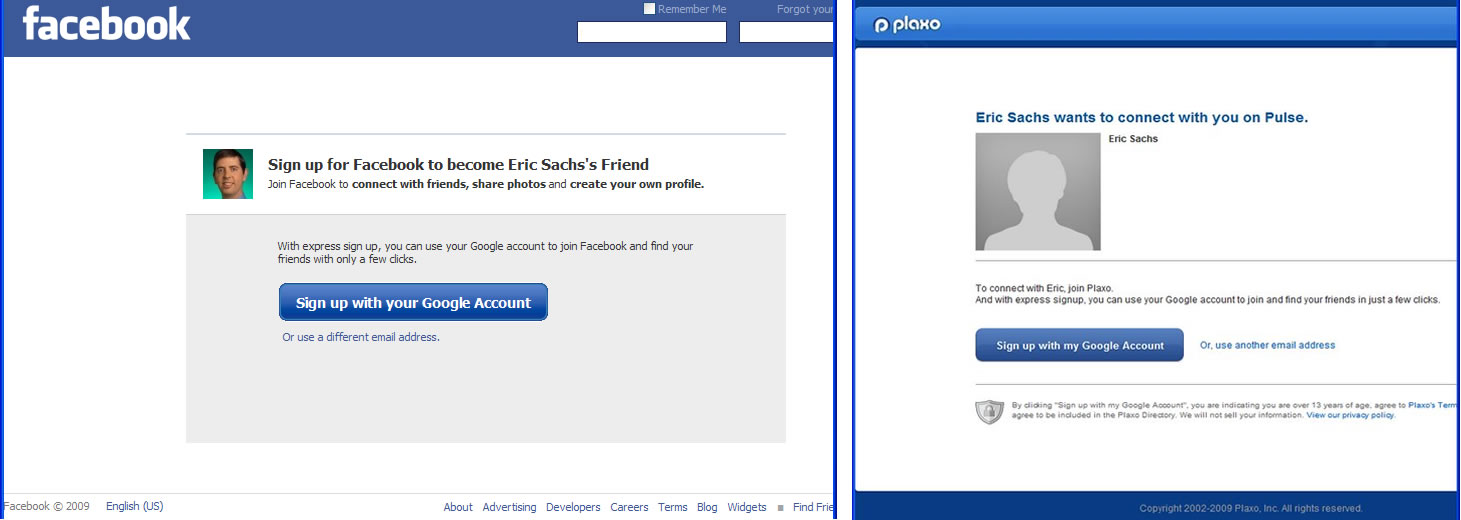
If you have used stuff like Facebook connect and Twitter Sign in, you know how easy it is to just click enter username and password and then just hop in. Well, not everything in the world is as easy, but soon the whole password username thing is going to be history, as there might be a universal account for most of your online presence.
Quite True, because webmasters and developers also see less conversions and members because of the hefty pain a user has to go through to register all over again. But now, with Google this is soon going to be history with Google’s Hybrid OnBoarding.
What users can soon expect from Google when invited from Facebook or Plaxo or other supported services,
Hybrid OnBoarding
Now it’s So easy to join up so quickly. Earlier it involved tons of steps, where you even had to confirm emails in one step and so on. But with this, it’s all click and done.
EasyBCD is an advanced GUI application that makes it easy to modify the Windows Vista bootloader and the entries in it.EasyBCD is 'NeoSmart Technologies' multiple award-winning answer to tweaking the new Windows Vista bootloader. With EasyBCD, almost anything is possible.
Setting up and configuring Windows boot entries is simple, you can quickly boot right into 1. Linux, 2. Mac OS X, 3. BSD straight from the Windows Vista bootloader
EasyBCD is geared for users of all kinds. Whether you just want to add an entry to your old XP partition or want to create a duplicate for testing purposes.If you're interested in debugging the Windows Kernel or hectuple-booting your seven test operating systems, EasyBCD is the key.
Automated MBR and BCD backups, boot sector restore kits, support for a dozen+ operating systems, detailed configuration of all boot entries, and award-winning guaranteed technical support is what makes EasyBCD stand out.
A simple & Effective Reboot Helper Tool iReboot sits in your taskbar at startup (consuming only 400KB of memory!) and lets you choose which operating system you want to reboot into. Instead of pressing restart, waiting for Windows to shut down, waiting for your BIOS to post, then selecting the operating system you want to boot into (within the bootloader time-limit!).
See in the above screenshot i choose Windows Vista to enter during reboot section.It restarts automatically and enters Windows Vista without bootloader time.
You just select that entry from iReboot and let it do the rest! If you likedEasyBCD, you'll just love iReboot too!
A lot of us who use Google Earth do not know about Flight Simulator mode in Google Earth. I have been using Google Earth for over 3 years now and was still unaware of the Flight Simulator tool until a few days ago. With Flight Simulator in Google Earth allowing me to take off from Kathmandu Airport into the mountains, it brought back memories of an addictive video game I had played as a teen almost 10 years ago.
The similarities with Flight Simulator by Microsoft were too many to not think of this mode as a backhanded compliment by Google Earth developers to Microsoft.
Over Mount Everest with Google Earths Flight Simulator
Google Earth: Flight Simulator
To start Flight Simulator mode start Google Earth and click on the globe once and press Ctrl + Alt + A. This starts the flight simulator mode and the following screen appears.
It is not very complex except the controls seem to be a little too sensitive. The HUD screen resembles being inside a airplane cockpit.
The idea is pretty amazing, especially for kids being introduced to Google Earth. Imagine flying around in a airplane over your own neighborhood on your desktop.
The whole feel of it, with selecting Airports from around the world and different plane models is very similar to very early versions of Flight Simulator by Microsoft.
Playing around with it I immediately realized that this Easter Egg within Google Earth was like a homage being paid to Microsoft’s Flight Simulator video game.
Microsoft’s Flight Simulator X was less of a game and more of a virtual environment for flying enthusiasts with a virtual environment to simulate the whole world. Google Earth is probably paying homage to a very old and loved video game.
Interesting Factoid: Flight Simulator software from Microsoft is 2 years older than its Windows Licence.
Being a fan of music across many genres I was quite excited with Google Music Search. Since I started using Google many years ago, I have always wondered if I could just type in the name of the song and could hear it online. That would be like going to music heaven. Google Music search almost gets you there but not quite.
The search apparently is very comprehensive but it also is a way to monetize music search with tie ups with content providers. This feature is not something to search and download pirated music. The feature is not a separate one but is bundled with the Google Search homepage without the need of using or tweaking any of the options. This could make Google the one stop shop for music in the world.
Music Search with Google
With a plugin in the works that will help you search a song with a part of the lyrics rather than the actual name of the song will be quite handy.
This service is brought together by Google with a tie up with imeem, Lala, myspace, Pandora and Rhapsody. These are popular websites dealing with selling online music content in the US.
For Indian users it is a little disappointing as these companies do not have the license to sell music in India and hence you cannot listen or buy music from these websites. The links to these services do not show up with Google search.
Saving grace is that almost every song has its video on You tube and usually that will be the first link you get when you search for a song.
As far as how useful it will turn out to be is still to be seen. But fact is almost everyone who has used Google has searched for music online with the search engine. This is where Google has got it right and might see it singing all the way to the bank.





 I think a lot of our readers may have used Digsby or atleast read about it. It has been reviewed a couple of times in the past on Devils Workshop. I have recently started using Digsby and I am hooked on to it. It has a simple, clean and easy to use user-interface along with a lot of really neat features.
 Today, Adobe Systems at 2009 BlackBerry® Developer Conference, Research In Motion (RIM) in India, announced that they were going to give the Creative Suite Professionals the chance to make Rich Content and applications for Blackberry!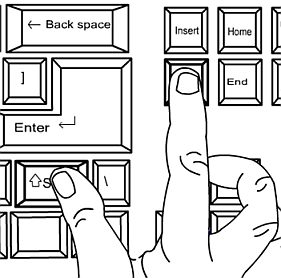

 Along with that, you can have a look at the most popular videos, Latest Additions and lot more. Sign in with your account and play your playlist, Favorite Videos and lot more! You can see Videos in Excellent Quality (HD if Available too) and when your using External Drives or sharing video via network it’s just too awesome. The Control Panel is too cool to be handled!


 File extensions are important attributes for the applications which allows you to process the information existing in a certain file. Practically, a file extension is the suffix added after the dot (.) sign and the