HAPPY NEW YEAR 2010

Knowledge Base is usually a database which stores information on a specific subject. Usually it is used for technical trouble shooting steps and the updating is done by an individual or an assigned team of experts. Microsoft has a knowledge base and usually the articles stored in a knowledge base has separate KB ids.
Alex Personal Knowledge Base is a free software which allows you to create your own personal Knowledge Base on your computer.

Installing the Knowledge Base software is quite easy. It is installed on your computer and can be exported to another computer with the export option.
One of the main examples of Knowledge Base being helpful is Microsoft’ Knowledge Base. If you search for trouble shooting steps on Microsoft website, you will get to see their kb articles. Alex Knowledge Base is not really meant for companies but for personal projects. It could also be used as a pilot Knowledge Base before moving on to a bigger and more sophisticated software.
Download: Alex Knowledge Base
Windows 7 , the latest operating system by Microsoft, has been introduced with plenty of new features to take over its predecessors Windows XP and Vista. Few previous features has been improvised to further strengthen Windows 7.
One such feature is Desktop Gadgets. Gadgets are light-weight single-purpose applications that can sit on the user’s computer desktop to ensure higher usability. They are generally designed to do simple tasks, such as clocks, calendars, RSS notifiers or search tools and can be placed on the sidebar, on which they are automatically aligned.
Here is list of 6 most useful Windows 7 Sidebar Gadgets:
1. App Launcher:

You can add applications, folders or Local drives to the App Launcher by dragging and dropping or by using settings.
2. Ultimate Search Explorer:

The Ultimate Explorer allows you to search different websites conveniently from your desktop in a single compact tool. You can search Amazon, Google, Digg, YouTube, Yahoo, Drugstore, The Pirate Bay, Wikipedia etc.
Download Ultimate Search Explorer
3. Media Player Gadget:

This ties into your Windows Media Player library and allows you to easily search it. It also displays album artwork, track information and enables visualizations while playing a song.
4. TweetZ:

TweetZ is specially designed for Twitter users, as it work s like twitter client. You can tweet and reply by accessing your twitter account using this gadget. It includes URL shortener that automatically shorten long links.
5. FB Explorer:

If you are a Facebook addict then this is one is the best Gadget for your windows 7 desktop. With the help of FB Explorer you can check all the information about your Facebook account on your Windows 7 desktop.
6. AdSensor:

This gadget is for Adsense users. AdSensor shows your current AdSense earnings on your desktop and saving time from checking every time on website.
Have you ever had this experiance that you wanted to call someone in the evenings and forgot every evening only to remember in the mornings? I often face this and sometimes I wish when its evening I had something to remind me about that call I have to make. I came across a website which does just that.
Memorari is a nice web site which allows users to set reminders and then send them over SMS, Email, ICQ, MSN, AOL messenger, Jabber and Yahoo chat. 

The days are over when Adobe Reader was the only option available to read PDF documents. Now we have many free alternatives like Foxit Reader, PDF Xchange viewer etc. This all softwares are freeware but not open source. Today I will show you one more free alternative for Adobe Reader which is not only free but also an open source program. And it is much faster then all its fellows.
It does not provide all the features which are provided by Adobe Reader, but still it’s good because it’s free and it’s much faster. Some main features of this reader are as below.

Youtube, is easily the number one online video site and has served well over 1 billion video playbacks. Speed is what you want? Wasting time moving your mouse and clicking. To Tiring? You got to know these shortcuts!
Spacebar = Play or Pause a video
Left Arrow = Rewind
Right Arrow = Fast forward
Up Arrow = Increase Volume
Down Arrow = Decrease Volume
F key = Full screen view
Esc key = Exit full screen view
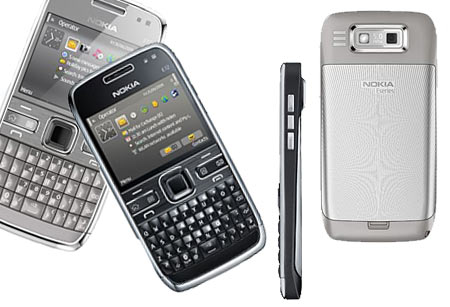
Ever heard of Nokia E71? Well even if you didn’t hear about it doesn’t matter. More importantly we are here to talk about Nokia E72. Yes, E72 has arrived in India and costs around Rs 22,000 . The business oriented phone builds upon the foundation set by Nokia E71 and brings improvements as well. For starters, it has a higher resolution camera (5 megapixel camera), faster processor among other interesting and exciting features. To get you more excited, Nokia E72 is the first E-series mobilephone, to be equipped with a 5 megapixel camera. Specifications of this very cool device is provided below.
Nokia’s buzzing handset, N900 has been in the headlines for lot of time and it does have a tough reason to be there. For all Skype lovers, here is a good news.
Nokia N900 has got Skype Integrated with it, to the core! You don’t need to download ant skype application or launch any. All you got to do is login and call!
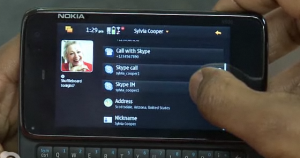
Once you are logged in, just shuffle over your contacts, make a Skype to Skype call which is completely free or Make a call abroad for damn low charges.
So what do you get out of this?
Often when I work online, I need to store some text or write down notes. Sometimes I have a random idea and need to put down some words so I can look them up later and work on a concept.
What I do is write down notes on a Notepad and save the file on my desktop. As I work from different computers, I end up using Dropbox to make the file available on two different computers. This led me to try and look up for a notepad which can be used online and Simple Text does just that.

Simple Text does work with an Write Room for i-Phone application. Being open source, I think there should be more applications available across various platforms that support Simple Text. Some might say a notepad is not that important or even relevant. But I disagree here. Notepad applications are still relevant especially as a blogger I often feel the need to save or write down a few notes which I can refer to later.
Data loss is a nightmare for any of us. Imagine your hard disk crashing overnight for no reason and you, loosing all your hard earned data in a split second (It actually, has happened with me, once).
Scary? Well, keeping backup is the fool proof idea to keep your data safe. Today, I’m going to tell you about the best-of-the-best data backup and sync tools available on the internet which will enable you not only to back up your data, but also to access it from anywhere in the world.


Bing has signed a deal with News Corp which gives them access to their content. It should not be really all that important except that News Corp only a few weeks ago had sent out feelers that they were about to de-list their websites from Google Search. This will probably start another round of the competition between Google and Bing.

The question is really debatable. Can a company lay claim to an event that happens in the public domain. I think that the way forward for news content providers would be to monetize their websites by having visitors and show them advertisements. This is done by many news providers anyways.
To expect people to pay for subscription is something that will probably not work. People are not really going to pay for content which they get for free somewhere else. For example you can gets access to news from a ‘tweet’ on Twitter. It does not even need a Search Engine to get the word around now a days.
How many times have you encountered the situation that you really wanted to listen to a song and that song isn’t in your iPod? Rather, it is lying in that lonely computer back at your home. If that has happened to you anytime, we are presenting a solution for that. Today, we will tell you how to turn your computer into a radio station so that you can reach your music database from just anywhere in the world.
There are many possible sharing solutions you may think of, like file sharing etc. but have you ever thought of streaming your media? Streaming is the technology which enable people to hear your music over the internet without downloading anything. Another plus point of doing this is, there can be a single PC storing all the music and there can be multiple PCs connecting to it. This way, this technology can prove to be a massive disk saver.
All this can be achieved by downloading a free Java-based application called Sockso
Features of Sokso
Simple process for setting up Sokso on your PC


 Dynamic Controls recently showed up an App for iPhone which allows iPhone users to control their WheelChair via BlueTooth. If you’ve used Nike+ with your iPhone or iPod you know what kind of stats you get out there and so you’ll be getting such kind of statistics for you wheelchair too like Speed, Direction, etc. It has also got a inbuilt charger for iPhone.
I don’t know if the Wheelchair part was that interesting but possibly, this could be the starting of Physical objects controlled via iPhone and perhaps we are going to see iPhone apps to control cars and household appliances too which may benefit us a lot!
Everyone likes software’s however, they are also very conscious about to keep their software updates. Unfortunately people don’t know which version launched the updates. Other things, whenever they install everytime they have a fresh windowd to install the software. So, they have to go to multiple websites. Ninite is freeware online tool that provide the platform for install multiple app installer. You can choose your desire application.

Ninite Installer
Software available for multiples sections like below
How to Install the software ?
Like above categories are defines. you need to check your software and you see the “Get Installer” option in bottom of the page.

ninite box installer
Enjoy the installer and keep your software up to date. You can check it out here.
When you use the Chrome Browser there are details which can be stored based on the unique ID. This browser is a favorite of mine and I love its functionality along with spartan design. Chrome is undoubtedly much faster than most other browsers out there.

Google Chrome uses a client_id variable which is unique for every Chrome user. This can be used to create user profiles of a user’s actions while using Chrome. You can delete this information and secure your browser by using a free software called Chrome Privacy Protector.
It is a unique ID given to collect statistics of usage. Often such usage is used for tracking the usage for improvement of the browser. You may not choose for usage to be tracked in this way, but in case you are using a computer that is not yours or a public computer with Chrome you might like to try out Privacy Protector.

Google has finally released Chromium OS as a open source project. The news about Google’s Chrome OS has been received by people with anticipation which is expected but views on the OS are different in many ways. Some experts think Chrome OS will drive Google to go the Microsoft way. Others think it will not last and the idea of an Chrome OS is not suitable when Linux is still around.

Many blogs might be taking the name of Chrome OS as competition to Windows 7, but I doubt that is the case. Google has kept its focus on internet functionality unlike Microsoft which is multi focused. I doubt Google is even looking to rival Microsoft’s Windows with Chrome OS. The impact Chrome OS will have on the Operating System market is still to be seen. Being still a year away from when it might get out of beta where Chrome OS will position itself is difficult to predict.
But if Google gets Chrome OS right, there is a good chance that people who are just using the internet and their browser with their computers might just dump Windows and move over to Chrome. I do not see Mac users dumping their Macs for Chrome OS as most people who buy a Mac would need their computers for a lot more than just using the internet.
Hi all our loving reader a good news for you all.If you wish to earn money online your wish is now became true.You can earn online with out investing any single rupees.You get paid for reading sms on your mobile or reading email or you can get paid for click on ads display on website or get paid for surfing.
PAID EMAIL:-
Getting paid to read email is one of the oldest yet powerful get paid programs. All you have to do is register with advertisement promoting companies. They will send you paid emails. When you read this emails and visit the link you get paid. Paid emails are very much simple.
all paid to read company allow to all user to sign up for free. and those company are as under.
1.Rupee mail (Only in India)
2.HotMail
3.Send More Info
4.InboxDollar
PAID SMS :-
1. MGINGER (Highly Recommended)
Earn money for reading sms on your mobile
Get SMS ads of only those products that you want to buy
Get ads at your convenience
Save money through discount coupons and offers
Earn much more money by inviting family and friends
Get 20 paisa for every ad you receive
Get 10 paisa for every ad your friends receive
Get 5 paisa for every ad your friend’s friends receive
Accumulate Rs.300 & receive a cheque
Really it’s a new concept to earn extra income through our cell phones without spending any thing.
These ads are only about your interests. Not only that, you get to decide when you want these ads.
2. MGARLIC
MGarlic pays you money to receive text SMS ads on your mobile.
They also pay you for each SMS that your friend or friend of your friend referred to MGarlic by you receive.
Member Benefits
Choose interests about which you want to receive SMS and get paid for it.
You decide maximum number of SMS you want to receive in a day.
Save Money by using discount coupons offered by Advertisers.
3. SMS2INDIA
Earn money from SMS as well as e-mail, benefit from both in equal manner.
Earn equal amount at each network level, for both SMS and e-mail.
Earn from increasing your network. Up to 2 levels.
Check the advertisements at your own convenience. No more bombardment of advertisements.
Receive discounts/coupons/offers of your interest in your inbox.
Special privilege and advantages to registered users.
Receive advertisement of your preference & interest.
Have a larger network and earn more.
4. YOUMINT
YouMint is a unique social utility that connects you with people around you. Only real people!
YouMint pays you to invite friends and to receive SMS promos! It might just pay your Mobile bill
5. EARNBYADS
Earn 10 paise to 2 Rupees for receiving ads.
You can earn money/credits by giving referrals, considered only when the referrals register to the earnbyads.co.in.
Minimum payoutis Rs.500.
6. M-EARN
So far, you always paid for using mobile services. But this scheme has changed the flow. You will now earn money for reading SMS you receive.
You now have the freedom to choose; you can furnish your interests and receive offers and discount coupons from your favorite stores and brands.
Get sms ads at your convenience; You decide the number of ads you like to receive per day and also the specific time of the day for receiving them.
This is not just about ads or money but it is much more. Features like mind notes and coach me would change the way you have been using your mobile
This service is still in beta. But since this is going to be the next big boom, you can take the advantage of signing up right now and building up a network so that as soon as the service is rolled out of beta you start making themoney.
7. ADMAD
You can earn from 5 referral levels
Get 20 paise for each SMS you recieve.
Get 15 paise for each SMS your friends receive.
Get 10 paise for each SMS their friends receive.
Get 5 paise for each SMS their friends receive.
Get 1 paisa for each SMS their friends receive.
8. GAVOOR (WEBSITE NOT WORKING)
Get 10p for every SMS you receive.
Get 10p on every SMS your friends receive!
Get 5p on every SMS their friends receive!
Get 3p on every SMS their friends receive!
You receive some advantage to buy products.
I have Kaspersky Anti-Virus one year license codes to give away and all you have to do is enter this contest. Kaspersky Anti-Virus 2010 provides complete antivirus protects your internet usage and keeps your PC free of viruses, worms and Trojans.

Microsoft have released the beta version of MS Office 2010 and it is available for download and that too for free.It was first released to technet and MSDN subscribers and now it is made available to public.
The cool new Office comes with variety of products in it. The list of services available in the professional beta version are as below.
The beta version is available in English, Chinese, French, German, Japanese, Russian and Spanish and is valid till October-2010. Size of installation package is something around 700 MB.
You can download this from official Microsoft Site. All you will require is a live id and Password to get your free beta Product key.
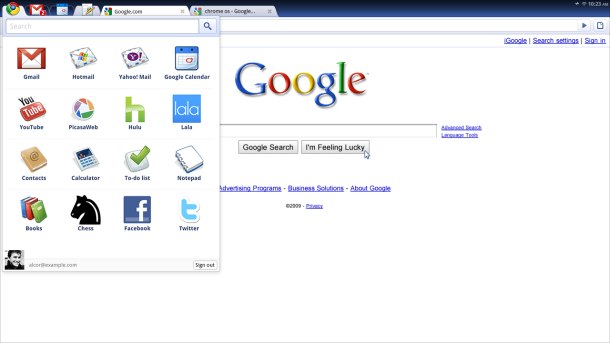 Google Had announced that it would be releasing a OS version of it’s browser Chrome in July. The Press event yesterday gave us a lot of more information as to what was going on, what were the key features and so on.
With Clouds i don’t mean actual clouds, but these are where all your data on Google Chrome OS Data will be stored. Well, nothing is on your computer so you can surely expect better speed and also the data is easily accessible from all of your devices so that you do not need to Shift it from one device to another.
Chrome was the fastest browser and one of the reasons why it was so because of it’s fastest loading Javascript Load Engine. You can expect the same thing from the Chrome OS which currently takes 7 seconds to start up and this is also going to be reduced as the development further progresses. Your Desktop Environment is also going to speed up because all of it apps are going to be web apps so compared to existing computers, it is damn fast, you get it?
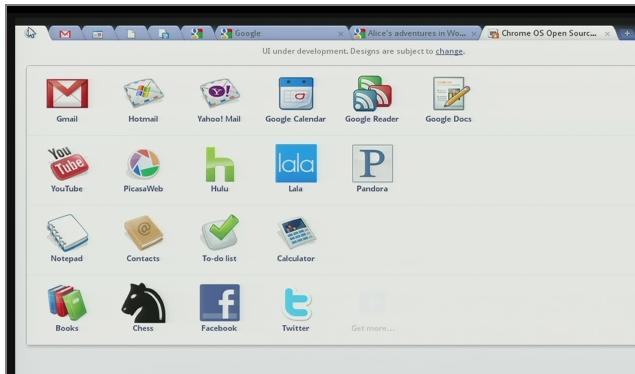
Chrome OS would mark the beginning of the new era, the web era where all your content is on the web. You don’t need to start any Softwares or such to start working on your computer. Everything is just web. All applications are web apps so you don’t need to install or update them as so.
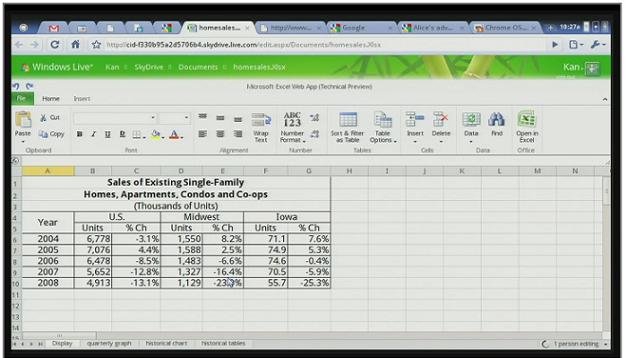
SpreadSheets on Chrome OS

The Graphical User Interface is going to be the same as the chrome browser, the easiest to use but the capabilites just increase 10 fold. Games, Videos everything can be done on the relatively simple interface.
Last Year Google Chrome was updated over twenty times without even letting thier 40 Million Users know about it. How is that? Well, same is going to be in the Chrome OS where the updates will be on air updates. So users don’t ever need to search for updates, download them and install it manually. Everything will be automagical.
With Google Chrome OS new Security as all your data will be Encrypted and will be stored on the Cloud. So significantly all your Data Loss Risks and Data theft risks are reduced. No Antivirus needed!
Second, because all apps live within the browser, there are significant benefits to security. Unlike traditional operating systems, Chrome OS doesn’t trust the applications you run. Each app is contained within a security sandbox making it harder for malware and viruses to infect your computer. Furthermore, Chrome OS barely trusts itself. Every time you restart your computer the operating system verifies the integrity of its code. If your system has been compromised, it is designed to fix itself with a reboot. While no computer can be made completely secure, we’re going to make life much harder (and less profitable) for the bad guys. If you dig security, read the Chrome OS Security Overview. Via Thier Blog.
This was much expected from Google who made Chrome OS an Open Source project and the source code is available here. Open Source Means you can expect more from developers world wide.
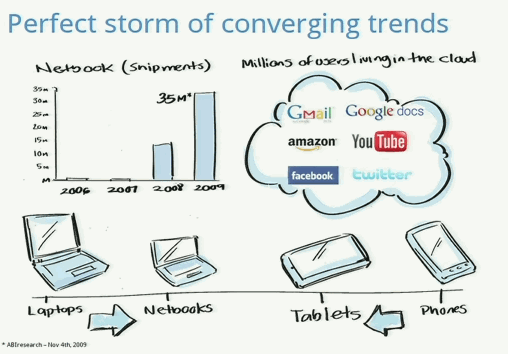
The Chrome OS is more concentrated on the NetBooks market because it wants to target the potential of that market which is growing speedily.
The whole Chrome OS concept is completely opposite to what we use today.
Today : Browser in Operating System
Tomorrow : Operating System in Browser (+1 from Google)
The Chrome OS is going to be absolutely free and consumers can expect it next year around November-December.
Keep All Your Softwares Up-to-date:
One of the best ways to protect your PC is to keep all your software up-to-date. Patching over security holes blocks online attackers who like nothing more than exploiting old software flaws to surreptitiously install Trojans and other malware.
The free Secunia Personal Software Inspector makes it easy to find and fix old programs on your PC, even those that lack automatic update features. It scans your computer to find out what versions of what software you have installed, and it reports on which might contain known security holes.
But the excellent app doesn't stop there. Secunia PSI also provides clickable links to download available patches or program updates, which makes updating most software a snap. Other helpful icons can open the program's folder, bring up online references for any security advisories, and perform other useful tasks.
Less technical users can opt for a simple interface mode that lists only easy-to-patch software. But it's worth trying the advanced interface, which displays a wealth of information about your installed software. The latest version includes a handy "Secure Browsing" tab that reports not only on your browser version(s), but also on any plugins, ActiveX controls, Firefox add-ons and other extras.
Secunia Personal Software Inspector
Finally the long awaited Yahoo messenger 10 is out. You can download it from the link given at the end if this article. The download link given here allows you to download offline installer of themessenger so once downloaded you can install it as many time as you want. The link given at the official site just downloads the small installer after downloading and running that file it will download the original installer from the yahoo server.
Burn Almost Any Video File To A Playable DVD


Easy File Locker is a light-weight and easy-to-use file lock software product for Windows. It can protect your private files and folders. With its great protection, users will not be able to open, read, modify, delete, move, copy the locked files/folders, or even not be able to see it. The hidden files/folders will be totally invisible to all users and to any program.
Features Of Easy File Locker
1. Lock files, Lock folders:
The locked files/folders are protected from accessing, users can not open, read, modify, move, delete, copy, rename the protected files/folders. Files and sub-folders in a locked folder are also protected.
2. Hide files, Hide folders:
You can hide your private files and folders, to make them completely invisible to users and programs.
3. Password protected GUI and uninstaller:
Once you set a password, no one can launch the application or uninstall the software without the correct password.
Easy File Locker
A Simple Utility To Convert Documents To XML Format
XML Printer is a virtual printer driver allowing you to convert any printable document to a structured and easy-to-read XML file.
What is a virtual printer?
Virtual printer is a physically non-existing printer that acts to the operating system like any other printer. This way the system or application prints as it would be an ordinary print device (ensures that the document will look the same), but instead of printing it stores all the printed information.
Key Features Of "XML Printer":

Wamon - Windows Activity Monitor
Windows Activity Monitor monitors user's activity on the computer, tracks active windows and processes, allows table and chart visualization.
Whom Can You Monitor ?

Google sand box is nothing but a probation period for your newly created website or blog. During this period your posts or article may not be listed on Google organic search result pages (SERP). Google won’t give weightage for those website for a period of time. During this period Google would be monitoring your website for its activities and pattern of posting and analysis whether it is a genuine website or not.
Many webmasters are disappointed during this period because even though they may have created a wonderful website with all keywords in place the site may not be listed for proper keywords on Google search. But it is important to know about the sand box effect and work towards website improvement during this period and wait for the sand box period to get over which may be from one month to six months.
If you target for keywords which are having more competition then your waiting period may be higher. This could be considered as a policy of Google to fight spam websites.
Most important here is to identify whether your website or blog is on a Google sand box or banned by Google. It is pretty easy to identify,for this you need to search your domain name as below
“site: example site:free-ticks.com”, if the count here is increasing as and when you post a new article then you can be sure that your websites are getting indexed and you just need to wait to get out of Google sandbox.
Google sand box is nothing but a probation period for your newly created website or blog. During this period your posts or article may not be listed on Google organic search result pages (SERP). Google won’t give weightage for those website for a period of time. During this period Google would be monitoring your website for its activities and pattern of posting and analysis whether it is a genuine website or not. Many webmasters are disappointed during this period because even though they may have created a wonderful website with all keywords in place the site may not be listed for proper keywords on Google search. But it is important to know about the sand box effect and work towards website improvement during this period and wait for the sand box period to get over which may be from one month to six months. If you target for keywords which are having more competition then your waiting period may be higher. This could be considered as a policy of Google to fight spam websites.
Most important here is to identify whether your website or blog is on a Google sand box or banned by Google. It is pretty easy to identify,for this you need to search your domain name as below
“site: example site:free-tricks.com”, if the count here is increasing as and when you post a new article then you can be sure that your websites are getting indexed and you just need to wait to get out of Google sandbox.
There are a lot of things you can do when your website is on Google sandbox
1. Try to add valuable posts or article on your website
2. Try to build links organically.
3. Try to promote website or blog through social networking sites
4. Try to harden website security
5. Try out different plugins and bring the website to a stable state
6. Finalize the layout and categories
So get ready for a better exposure after your sand box period.

Following are the hidden code for finding different settings on Nokia mobile
Code Action
*#7780# To restore the factory settings of mobile set
*#3283# To verify the set Manufacturing date
*#746025625# To stop the sim clock
*#67705646# Use to delete the operator logo
*#73# Use to reset game scores and phone timers
*#0000# Use to display the mobile software version
*#06# To display the IMEI Number of the mobile
*#92702689# To display the mobile warranty related settings (Serial no, Made,purchasing date, Repaired date, Life time).
*#7760# To display the Production serial number
*#bta0# Use to display Bluetooth MAC address
*#9999# Use to display the mobile software version
*#147# If you are using Vodafone then this code will help you show the last call detail
*#2640# To display the mobile security code
*#7328748263373738# Apply to resets the set default security code
*#43# To verify the call waiting status
*#2820# To verify the Bluetooth information
*#7370# To format the mobile phone memory
*#delset# To delete the GPRS AND EMAIL settings
#pw+1234567890+ 1# To display the lock status of mobile set #pw+1234567890+ 4# To display the lock status of your SIM
Most people who use search engines often use it for looking up local information. Google Search is quite handy to look up phone numbers for restaurants, hospitals and other important details you might require.

But what if I did not have access to the internet. Well I can always call up a friend and request him to search for an address or phone number. A few days ago I needed to find some phone numbers to all the hospitals in the locality I live in. I called this service JustDial and got all the information I needed. They sent me the address via email and also sent me the address and contact numbers through SMS. This was quite handy to look up locally listed businesses or services on the go.

I have used this service a few times, it is a great help during emergencies. Not everyone has internet access over a cell phone. People who are not really into using internet website can also use this service with a simple call from any land-line.
So what do you think? Is it the best local search engine for India as they claim. I definitely think their boast is accurate.
Yesterday I came across a online tool called Intodit to create a Wiki on just about anything. This is quite useful to create documentation or have a group working on a project to create a reference guide for some day in the future.
It can also be used for non-professional needs like creating a wiki for a city or even on a hobby. Wiki is a great way to learn as you can also involve other people with similar interests to add to the wiki and make it more comprehensive.

Dashboard while editing a page with Intodit Wiki

This seems like a ideal tool for people who have expertise on something, want to create a wiki and collaborate with others having with similar interests.
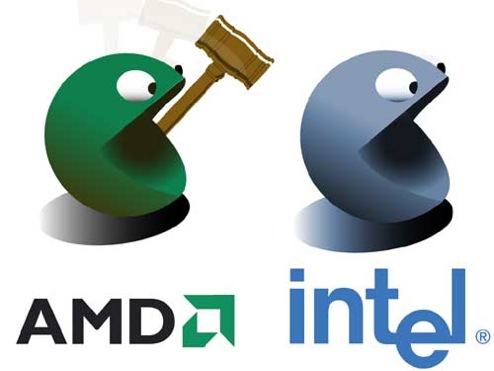
Intel Corporation and Advanced Micro Devices (NYSE: AMD) today announced a comprehensive agreement to end all outstanding legal disputes between the companies, including antitrust litigation and patent cross license disputes.
In a joint statement the two companies commented, “While the relationship between the two companies has been difficult in the past, this agreement ends the legal disputes and enables the companies to focus all of our efforts on product innovation and development.”
Under terms of the agreement, AMD and Intel obtain patent rights from a new 5-year cross license agreement, Intel and AMD will give up any claims of breach from the previous license agreement, and Intel will pay AMD $1.25 billion. Intel has also agreed to abide by a set of business practice provisions. As a result, AMD will drop all pending litigation including the case in U.S. District Court in Delaware and two cases pending in Japan. AMD will also withdraw all of its regulatory complaints worldwide. The agreement will be made public in filings with the Securities and Exchange Commission.
“This is a historical settlement for the microprocessor industry. The settlement will set transparent ground rules for open, competitive markets, with which Intel, in full public view, has agreed to comply. Fair and open competition dictates that the best product wins and market forces prevail. I am very confident that this development will help us strengthen our market position.” said Ramkumar Subramanian, VP, Sales & Marketing, AMD India.
So, as long as the competition keeps going, we as the customer have the freedom of choice and the market remains democratic. The day there’s monopoly, the company is free to manipulate the market for its gains and innovation hits a dead end. Any company needs to realize that competition is necessary and healthy. It helps them innovate and come up with new products to one-up the competition. It also justifies the reason to pay salaries to their sales & marketing departments that help promote the brand and attack the competition.
Did you even care about the dispute? Would you now care about this settlement? Do you think it affects you – the end consumer? Share your thoughts.

Here is a very cool and simple trick to hide any partition of our hard drive on computer. Many times we will think of hiding some confidential data form others.I have shown two easy methods to hide partitions without using any software.
Hide Partitions Using Command Prompt
1. Go to Start-->Run.
2. Type Diskpart and press Enter.
3. In the console type List volume to see all the drives available on your PC.
4. Now select the drive which you want to hide.
Note:
Here I have shown how to hide E drive.
5. In My PC it is volume 2 for drive E .
6. Now to hide drive E type Select volume 2 .
7. Then type remove letter e , this will hide your drive.
8. Now to get your drive back type Select volume 2 and then type assign letter e.
Hide Partitions Using Computer Management
1. Right click My Computer.
2. Click Manage or press letter G.
3. This will open Computer Management.
4. Under Storage, select Disk Management.
5. Right click on the drive which you wish to hide.
6. Select Change drive letters and paths...
7. Click Remove
8. Now can find your partition will be hidden.
9. To get back the partition Computer Management-->Select drive--> Change drive letters and paths
10. Now select Add option.
11. In that Assign the following drive letter.
12. Select ok.
That's it....
